Windows does not include Media Tek drivers so those need to be installed. They used to be on the tools page that Plamen put together and hopefully are still there!
I’m pretty sure I installed those. Otherwise, I don’t think the preloader parameters would have successfully been downloaded from the phone. But I’ll double-check.
If u saw it try to install software then u are right-that part worked-just not right. I bookmarked that tools page and things are still there:
I will flash my second phone back to Lunar OS using SPFlash as it looks like Ubuntu Touch won’t be getting out of beta for a while.
There is another tool that can be used for flashing-fastboot. Maybe fastboot will have better results?
There is a different recovery mode with Lunar OS that includes fastbootd and is what is used to open the phone for Ubuntu Touch.
Apparently @plamen has left the company, according to someone else on the forums. So it looks like there is no one here to help us. We’re on our own.
Man this is such bullshit.
Because of this experience I don’t think I’ll ever buy an electronic device from a startup again…
If we had the proper resources we could address these issues on our own.
1 Like
I tried twice to upload the version of Lunar OS that Plamen uploaded. Both of my uploads were taking forever as it is a 3.3 GB file so I left them uploading to brax.me and both uploads stopped. I don’t know why. I have a good Fios connection and brax.me says they will take a 4 GB file.
I guess I will try another server. I did successfully get Lunar OS on my second phone using Win 10. Coming from Ubuntu Touch I always lose my IMEIs. I wound up doing format all and download so that it wiped my serial number as well and then used SN Writer to re-write the IMEIs and serial number which are on the box the phone came in.
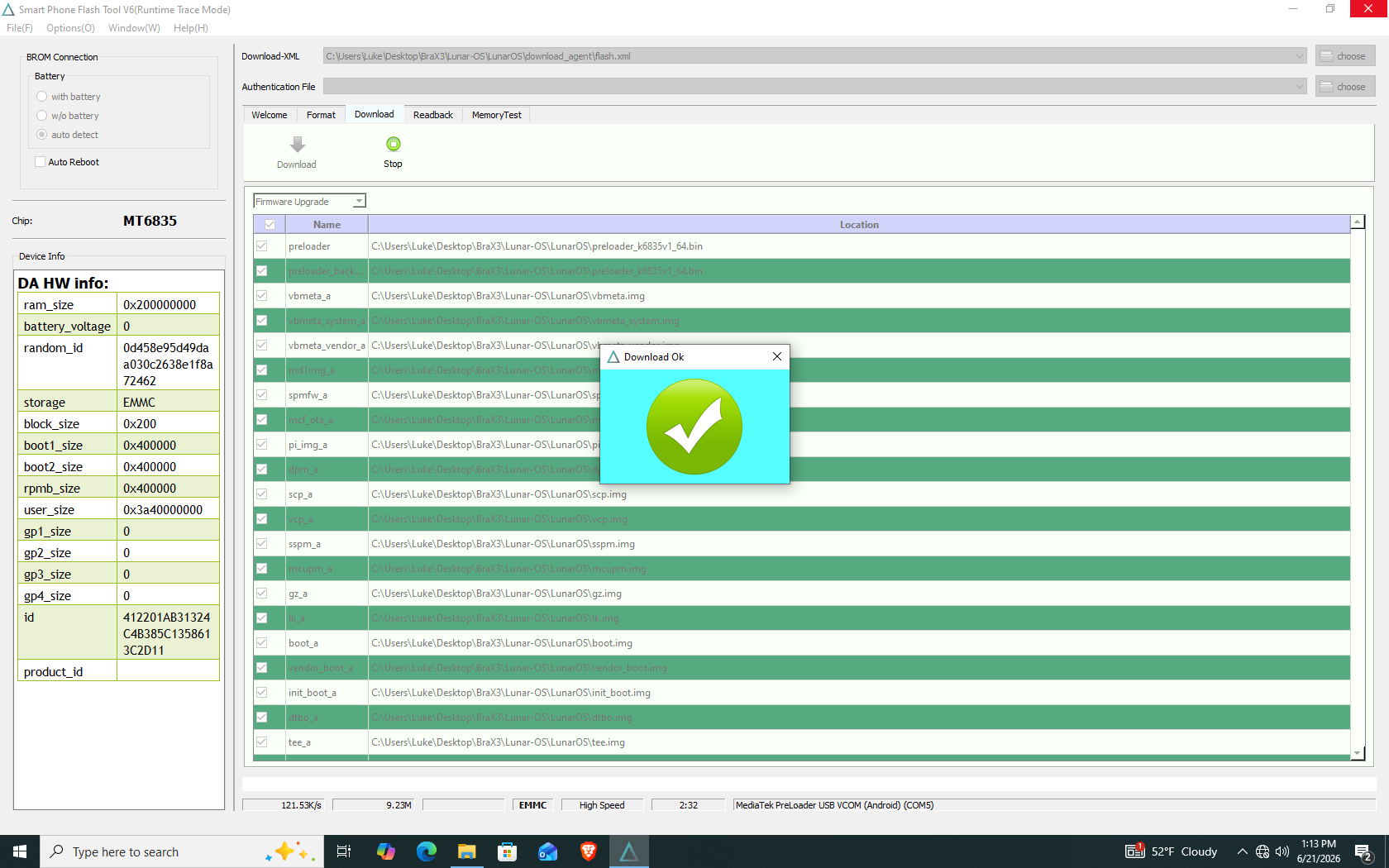
So this is what I saw when SP Flash was done installing Lunar OS the first time with just a Firmware upgrade:
1 Like
I did make a sha256 checksum file of the files in Lunar OS which is v6.0.0:
f458f7f29e19366758f2c620886314bcf540da56f1a40dd23db00d2152b43e52 preloader_raw.img
d58055b1e3287abe46c392c2c8112b76bac790fc0317e8c5a4cbf66559f5c6de DA_BR.bin
Here is the mtkclient output from my BraX3 phone running Lunar OS and using this command:
python mtk.py printgpt --preloader /home/lazarus/BraX3/Lunar-OS/LunarOS/preloader_raw.img --loader /home/lazarus/BraX3/Lunar-OS/LunarOS/download_agent/DA_BR.bin
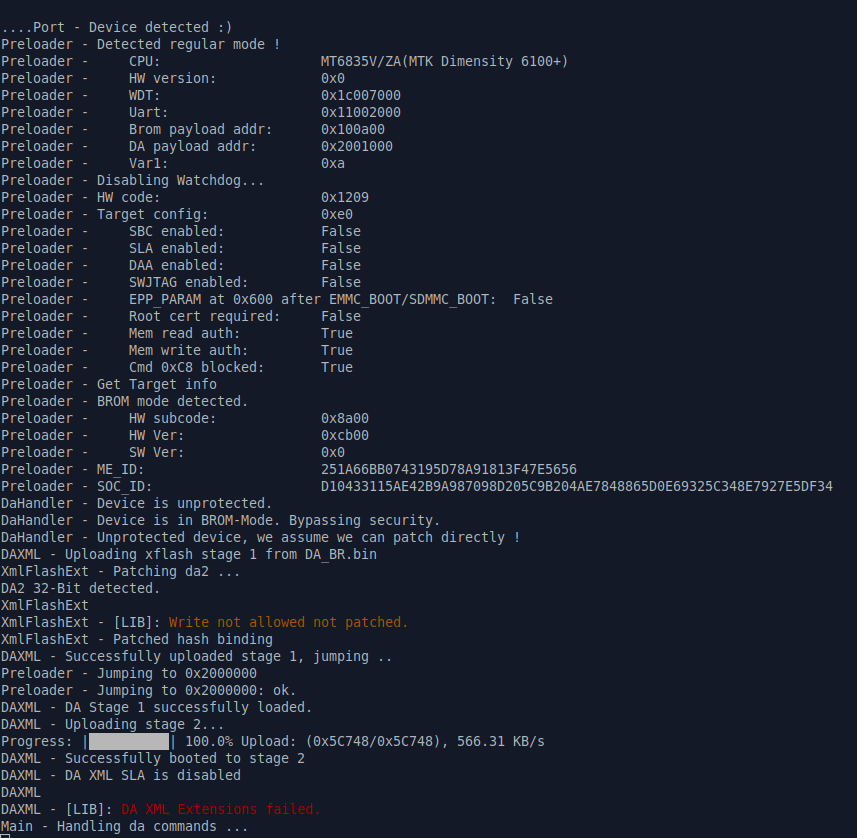
It looks like mtkclient can patch files in Lunar OS. I also did this on my iode’ BraX3 and it was not able to patch the files…but I was using the Lunar OS files and I’m glad that didn’t work. This is the output when that OS is installed:
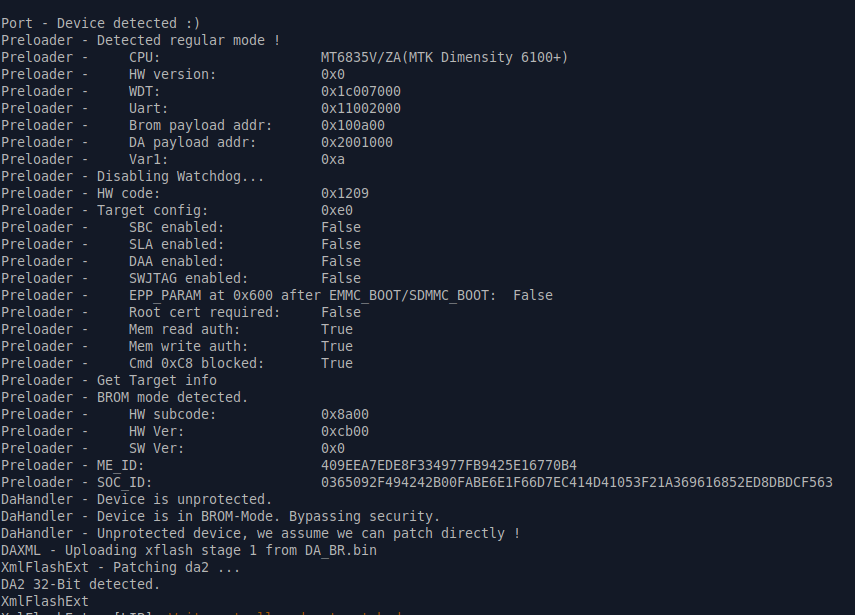
Also, it has been my experience on these BraX3 phones that they are locked down by default and it is difficult to do much on them in iode’ or Ubuntu Touch because of these restrictions. Lunar OS permits operations on the phone that other OSs do not! 
1 Like
We finally got to trying to get the phone in recovery mode, which she was able to access by holding the power button and volume up buttons. She selected recovery mode. Once it was completed (it did show an error but continued until it read
ERROR: recovery: [libfs_mgr] Failed to open / sys/fs/f2fs/features/linear_lookup: Permission denied
Then it continued
Formatting / data…
Formatting / metadata …
Resetting memtag message…
Data wipe complete
THEN, she turned it off. When she pushed power button it started the boot loop again. Got nowhere, SLOWLY.
I was wondering that very thing. “Plamen” was so very responsive and engaged, and then, nothing. Rob says it’s a different endeavor to which he is not responsive. Their tech support customer service is abysmal. Very disheartened.
1 Like
Well u did get it into recovery…so that’s progress but it didn’t fix the phone. I think the Lineage OS recovery screen is lacking because it doesn’t give u the option to load an external file there like Team Win Recovery used to have. If u can get back into that recovery and then go into advanced then u could power it off. Hopefully it will do that.
I know u said flashing a phone is not what u wanted but I think it needs the partitions rewritten and SP Flash is the easiest way of doing that. Just choose download. From there u can reset it in SP Flash with iode’ 7.5 using this file:
https://download.os-source.co/brax3/iodeos/v7/7.5/iode-7.5-20260519-brax3-spflash.zip
EDIT:
If u can get that phone to stay powered off then hook into a wall charger for a couple hours before trying to flash it.
I’m still waiting on an address to send my phone to. Been over a week and nothing. My device is still completely bricked. Cannot even boot to recovery or fastboot mode.
Brax’s own instructions for unlocking the bootloader is bricking devices. And there are forum posts from last year experiencing the same problem. So this was a known issue, but was apparently never dealt with.
The major issue with the first batch of Brax3 phones was bad memory chips that required a complete phone replacement. And they’ve been processing RMA’s since that time, yet for some reason, now don’t have an address available to send my phone to.
It’s hard to describe how piss poor this whole experience has been since ordering the device back in December 2025.
1 Like
Not good! Maybe that’s why the 1 tech guy there left. I have an account with Mega and they say I can upload up to 20 GB there. The Lunar OS file is 3.3 GB so the upload should work there this time.
This works if u can only get SP Flash to connect. On the advanced recovery u can get it to power off but u cannot see anything on the phone screen now so it sounds like your phone is beyond flashing!
U might find this Lunar OS download helpful! 
1 Like
@aMomarch @divde @lab26 @Lazarus
So, support emailed me a link to their warranty return page where you can initiate an RMA.
The new page is located here: https://my.braxtech.net/
Just enter your email address and it’ll send you a link via email to actually log in. Once there, you should be able to see your previous orders and you can select the device and request the warranty return option.
I don’t know how long it will take to process, but at least it’s a start!
2 Likes
@Lazarus @TheCanuckdian Thank you very much for your answers.
I will try with the Lunar OS v6.0.0 firmware and share results when possible.
1 Like
Thank you so much for sharing that info and tagging me. That way, I received it by email and did not miss it! Much appreciated!
How many Californians does it take to change over to Brax 3? One, thanx Rob!
Unboxed phone, stoked, played with phone, super stoked. Sort of stymied, not so stoked. Here goes, stoked.
Via Wi-fi (no SIM) didn’t do location (Settings). Entered sign-ups IOEDS, Aurora; ‘petered-out’, kept playing. About time.
Reset advisable? Turn off phone - hold down ‘power button’ and ‘volume up button - then follow instructions on screen to reset phone!? Please advise?
M. RoW.
@TheCanuckdian @divde @Lazarus @aMomarch
I have both Brax3s available now and switched tools to the mtkclient repo tool on Ubuntu 24.04. My old LunarOS zip package is about 1.56 GB, from a download back in August 2025. This seems to be LunarOS 5.15.148 based on a contained .config file.
The checksums for preloader and DA files in my old LunarOS pkg match the checksums in a previous post by @divde
sha256sum ../brax3-lunaros/preloader_raw.img
64b218d2ea054af02017abffff52310806702d827e7b775376ea7e15ce655434  ../brax3-lunaros/preloader_raw.img
sha256sum ../brax3-lunaros/download_agent/DA_BR.bin
97e22d89126a1aabedb2773b8f4ac50ea0dcb58c6e8c4cb95abe5a0b95ea0fe3  ../brax3-lunaros/download_agent/DA_BR.bin
I compared this command on each device.
mtk printgpt --preloader ../brax3-lunaros/preloader_raw.img --loader ../brax3-lunaros/download_agent/DA_BR.bin
GoodBrax3 (old hw device)
- Power off GoodBrax3
- Run the above mtk printgpt command
- Connect GoodBrax3 usb cable
The output is almost identical to the post by @divde and looks successful because it seems to be waiting for DA commands. Tail end of output is:
DaHandler - Device is unprotected.
DaHandler - Device is in BROM-Mode. Bypassing security.
DaHandler - Unprotected device, we assume we can patch directly !
DAXML - Uploading xflash stage 1 from DA_BR.bin
XmlFlashExt - Patching da2 ...
XmlFlashExt
XmlFlashExt - [LIB]: Write not allowed not patched.
XmlFlashExt - Patched hash binding
DAXML - Successfully uploaded stage 1, jumping ..
Preloader - Jumping to 0x2000000
Preloader - Jumping to 0x2000000: ok.
DAXML - DA Stage 1 successfully loaded.
DAXML - Uploading stage 2...
Progress: |██████████| 100.0% Upload: (0x5C700/0x5C700), 2.16 MB/s
DAXML - Successfully uploaded stage 2.
DAXML - Successfully uploaded stage 2
DAXML - DA XML SLA is disabled
DAXML
DAXML - [LIB]: DA XML Extensions failed.
Main - Handling da commands ...
BadBrax3 (new hw device)
- Do nothing on the phone because it is likely still in a reboot loop with no screen activity
- Run the above mtk printgpt command
- Connect BadBrax3 usb cable
The output starts out matching the GoodBrax3 output until it diverges. The BadBrax3 does not stay connected. Tail end of the output is:
DaHandler - Device is unprotected.
DaHandler - Device is in BROM-Mode. Bypassing security.
DaHandler - Unprotected device, we assume we can patch directly !
DAXML - Uploading xflash stage 1 from DA_BR.bin
XmlFlashExt - Patching da2 ...
XmlFlashExt
XmlFlashExt - [LIB]: Write not allowed not patched.
XmlFlashExt - Patched hash binding
DAXML - Successfully uploaded stage 1, jumping ..
Preloader - Jumping to 0x2000000
Preloader - Jumping to 0x2000000: ok.
DeviceClass - USBError(5, 'Input/Output Error')
DeviceClass - USBError(5, 'Input/Output Error')
DeviceClass - USBError(5, 'Input/Output Error')
DeviceClass - USBError(5, 'Input/Output Error')
...
DeviceClass - USBError(5, 'Input/Output Error')
DeviceClass
DeviceClass - [LIB]: Device disconnected
2 Likes
Thank you @lab26
Actually, I have some very good news: with a lot of reverse engineering I was able to produce a patched preloader and download agent that allow reading and writing to any partition on my bricked BraX3 (I succeeded in writing back para and dram_para). My device seems to be bricked because of failing DRAM initialization (after some partitions were zeroed). I have not yet finished the investigation. I will share results as soon as possible.
(Note that I am not an expert in reverse engineering, I used artificial intelligence, not Anthropic models, as their safety measures prevent doing anything useful as soon as they process the debug logs of mtkclient)
2 Likes
Great to hear. I have not yet figured out next steps but I was looking at this reference:
https://xdaforums.com/t/fixing-bricked-preloader-on-mediatek-mtk-devices.4670984/
I will probably wait for your tips.
1 Like