Thank you.. before I posted the question I also tried the press 1 but nothing pops up. 
I dont know why my phone doesnt react the same as everyone else here….
Thank you.. before I posted the question I also tried the press 1 but nothing pops up.
I dont know why my phone doesnt react the same as everyone else here….
You wont get a “pop up” when long pressing the 1 on the dial pad. It initiates a call which you must then listen to and follow the prompts. your carrier handles your voicemail. The call is going to go to your carriers voicemail inbox connected with your phone number.
No call was initiated. I short pressed, long pressed, tapped…nothing happened. I search system setting for voicemail related but only found voicemail notification there is no voicemail setting. Where does the voicemail show up in the Fossify phone app?
Stupid question but did you set up your voice mail on the carrier side before trying to access it?
yup…like Igor stated, you need to contact your provider as it is they who handle voicemail…not the phone. If long pressing 1 does not initiate a call to your carriers VM tied to your phone number, than it is a configuration problem on the carrier end. Voicemail is a “service” provided by the carrier…not the phone/
You could try to call your own number. See if that gives you any options.
ah I see what’s wrong. I thought you were telling me to press 1 in the Fossify phone app. I switched back to the default app, press 1 does take me to voicemail. But my question was how to check voice mail inside Fossify phone app so I dont need to switch back and forth with the default phone app. There is no voicemail in the Fossify phone app?
Yes calling myself works. Thanks
excellent! It would seem that the fossify phone app is not configured for speed dial [dedicating one single number on dial pad to connect with one single contact. Android does this automatically with the #1 being dedicated to your number/voicemail. I do not have fossify phone. You could try and go into sttings on the app and see if you can configure speed dial. Worth a shot.
OK great. What about the issue with incoming call that doenst show up on my screen when my phone is unlocked? How to fix that?
I am pretty sure that it is just a configuration issue. With this phone there are several layers of permissions both in the phone app itself and with the display settings etc… I will try and post progressive screen shots of my permissions and maybe that will help. Remember, this is a phone designed for privacy first so that means some convenience will be set aside. It was a bit of a learning curve to get familiar with all the ways this phone and its layered approach to privacy/security are implemented. Hang in there.
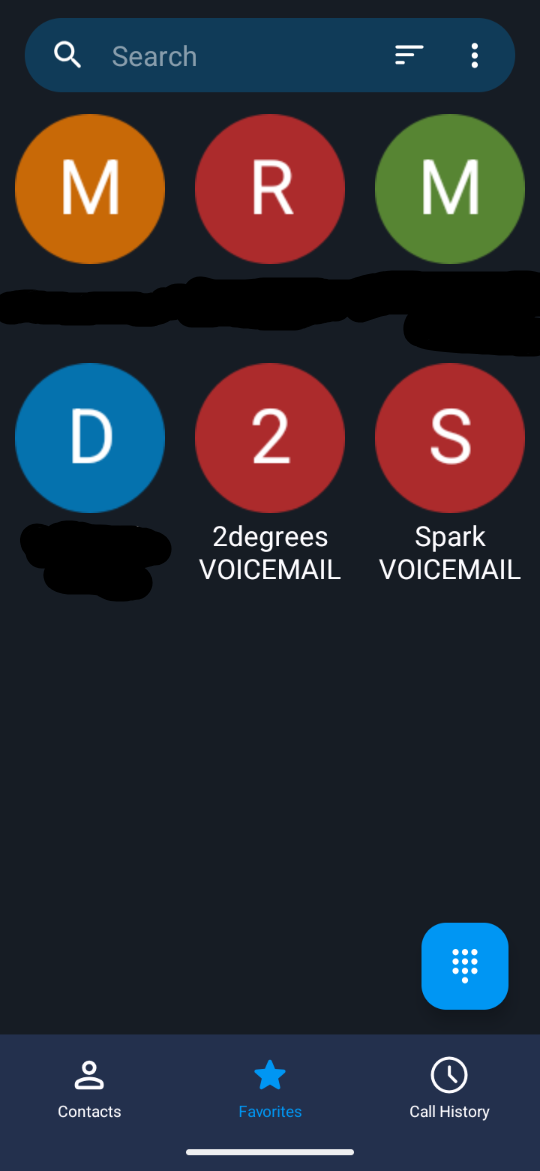
For Fossify Phone & Contacts I just have the telco default voicemail number(s) loaded as a contact and then pinned as a Favourite for quick access (I normally load a small image of the provider ‘logo’ locally in the contact, so its visually quicker and easier to pick out too). e.g. 707 or 200 or 0800 xxx xxx, or whatever…
And yeah Fossify Phone is very minimalist so no speed dial numbers AFAIK.
same problem since day one. T mobile is carrier
same attempt to solve problem. Welcome to the Brax 3. 95% of receeved calls can only be answered by phoning them back. l tell them my Brax3 is so secure that I can not be reached by phone. Who uses phones anyway. Carrier is T Mobile.
Tried it still same problems. Rings but I can RARELY respond to the calls. 95% must call them back. I tell callers my Brax 3 phone is so private I can not answer until I can check them out first! ha ha. A nice feature. Message to callers: “ My phone will not answer because YOU are not trusted.”