I tried to transfer files from an external SanDisk SSD drive to my new phone. The drive wa not listed within the files app, like Rob’s video. Any ideas? TIA
1 Like
Currently troubleshooting this also. Apparently a handful of my usb flashdrives (A and C), and SSDs wont allow the device to manage them.
No solutions yet, but i just started looking at this 30 mins ago
2 Likes
I have tried several external USB C storage devices and none of them are recognized by the phone. It will beep when the device is connected, but files cannot find it…presumably, its not mounting successfully. Is there a system log I can check for this? Is there a recommended brand or device which will work?
Try this:
When you get the beep it is connected, go to your “Settings” for your phone and type in
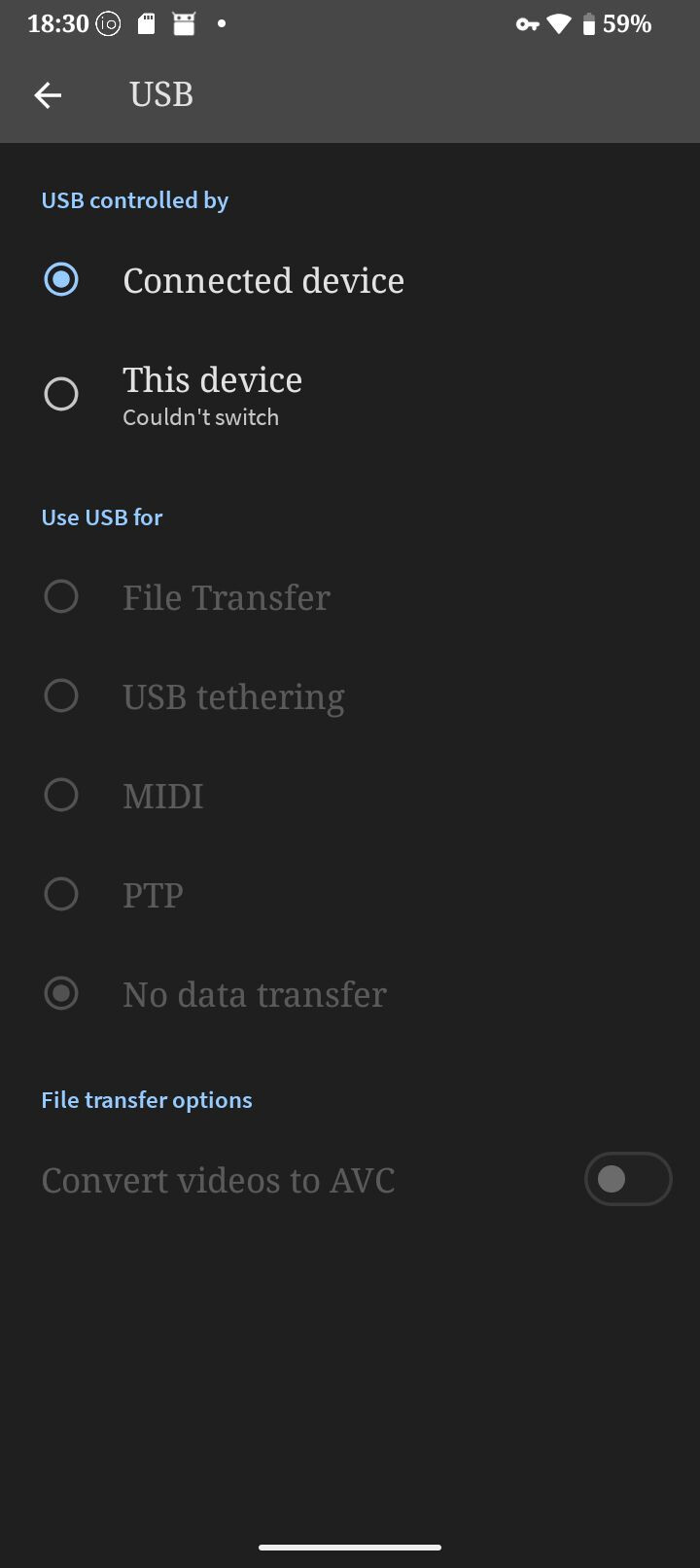
“USB” into the search bar on the top. It should bring up a list of subjects related to USB on your phone’s settings. Choose “USB controlled by” and look at these settings. “USB Controlled by” determines if the phone or the other device controls the USB port. “Use USB for” sets up what type of connection you need; File transfer, USB tethering, MIDI, PTP and No data transfer. Try playing around with these settings. It can be counter intuitive as to which device controls the USB port, but try switching it around and it should connect.
Also, I have found you might have to leave the device control on what it defaults to, change to the type of connection you want and THEN choose which device controls the USB port. Kind of nutty, for sure.
What are the drives formatted to. If you format them in linux, the default linux format i believe is not readable by android.