I looked into Visual Voicemail with Mint Mobile. It wanted me to download the app from the Google Play Store. Not going to do it. I would have had to give them my Google ID. I searched for the app on Aurora and F-Droid and couldn’t find it. The regular voicemail works just fine. And, it didn’t require an app. I just had to respond to the text they sent me. Hope this helps.
Well, the issue here is that Pure Talk is an AT&T MVNO. AT&T device lists are whitelist meaning if the device isn’t specifically on their list, it will not be allowed on. I suspect Pure Talk doesn’t manage their own separate device approval list, but defer to AT&T’s list.
Braxtech is “working on approval” for the brax3 from AT&T but I only know that the same as you, it is listed as such at the top of this thread.
US Mobile, with their AT&T MVNO SIM card, does NOT use AT&T’s restrictive whitelist, and so the brax3 will register on it and will work.
Any “standard” iodéOS phone will work fine with Pure Talk or other AT&T MVNO carriers (and also Verizon and Verizon MVNO carriers) because the hardware behind those devices are already approved on AT&T (Pixels, Motorola, etc.) and on Verizon. The challenge is that the brax3 is a new hardware device not approved (yet) on AT&T, and likely never on Verizon.
Hi all, I have just today gotten my Brax3 online, but no fault of the phones. I was on Verizon, and just today was able to get setup & ported on T-mobile. I had hoped to utilize T-Satellite (Starlink connection thru T-mobile) but as yet that isn’t working. More later.
SO a quick summary of how this went for me.
- After contact T-mobile and all the pre-phone stuff, instead of waiting for a sim I elected to try the esim. This is how I had to do it:
1. Turn on phone, exit the setup menu. I haven’t figured out how to restart that, so I suggest anyone doing this make their selections first.
2. Go into settings, then Networks, then Sims, then esim.
3. Provide your 32-character EID to the provider.
4. T-Mobile’s rep initially thought they only had to set it up on their servers, but the Brax (Iode really) has 4 options you can use to point it to download the esim instructions, I picked QR code, which I had the rep email me, and I scanned it right off the monitor.
5. After it downloaded, you just follow the prompts.
6. I had to restart my phone for this to show under the Sim options, remember its setup for multi-sim use, but it also had a software update pending.
7. After restart, it did NOT automatically start using that esim’s network, I had to go back into the menu and toggle it to enabled, and then further down to use mobile data on that network.
After that it’s worked just as it should.
Now I opted to also get the T-satellite service, but even though T-mobile’s reps keep turning it on, I get an SMS to confirm, the service automatically sends me another SMS immediately saying it was disabled again either because of an account change or because of compatibility. I’ve gone thru 2 techs now who verify it’s supposed to be compatible, but who knows in these early stages. I mostly wanted it so when I’m driving out in BFE where T-mobile tends to not work, I can still get at least some connectivity. I’m willing to bet that will be eventually fixed, but I’m the patient type.
Hope this is useful info to others. Loving the phone so far. Came from a Galaxy S21 and this is just slightly larger without the case, but feels great in my phone. THe only complaint I’ve had so far is really my own steep learning curve for a deGoogled phone, this being my first.
I have Optimum Mobile. It claims to be fully supported.
I stick the SIM in and i get voice and text, but I can’t get data. I don’t seem to be able to connect to the mobile network. It doesn’t matter if I use the eSIM or a physical sim.
I went to the optimum mobile site where you can test your IMEI:
https://www.optimum.com/mobile/bring-your-own-device
I always get the error “The IMEI as entered is not compatible with Optimum Mobile.”
Support tells me the same thing.
This network doesn’t work with the Brax3.
Did you turn on mobile data?
Settings>network and internet >SIMs
Also, did your APN get configured properly?
https://support.optimummobile.com/hc/en-us/articles/4420244082327-What-APN-settings-are-needed-with-Optimum-Mobile
Are there any other instructions for setting up the DarkStar network. The only guide I found didn’t work. I can’t switch from AT&T, they’re the only provider that has coverage at my house.
Posting for completeness. I was not able to receive images or videos via text. The APN settings were not as simple as adding “wholesale”.
Here is what I had to input for the Tello APN in order to receive media:
- Name: Tello
- APN: wholesale
- Proxy: (leave blank)
- Port: 8080
- Username & Password: (leave blank)
- Server: (leave blank)
- MMSC: http://wholesale.mmsmvno.com/mms/wapenc
- MMS Proxy: (leave blank)
- MMS Port: (leave blank)
- MCC: 310 (I did not have this field)
- MNC: 240 (I did not have this field)
- Authentication Type: (leave blank)
- APN Type: default,supl,mms (make sure all others are unchecked)
- APN Protocol: IPv4/IPv6
- APN Roaming Protocol: IPv4/IPv6
- Bearer or Network Type: LTE or Unspecified
Good information. Thank you.
@wardee Are you able to group chat with these settings?
Yes, but I also had to go into the Texting app and turn on the 2 group MMS settings to get that to work properly (or at least ok):
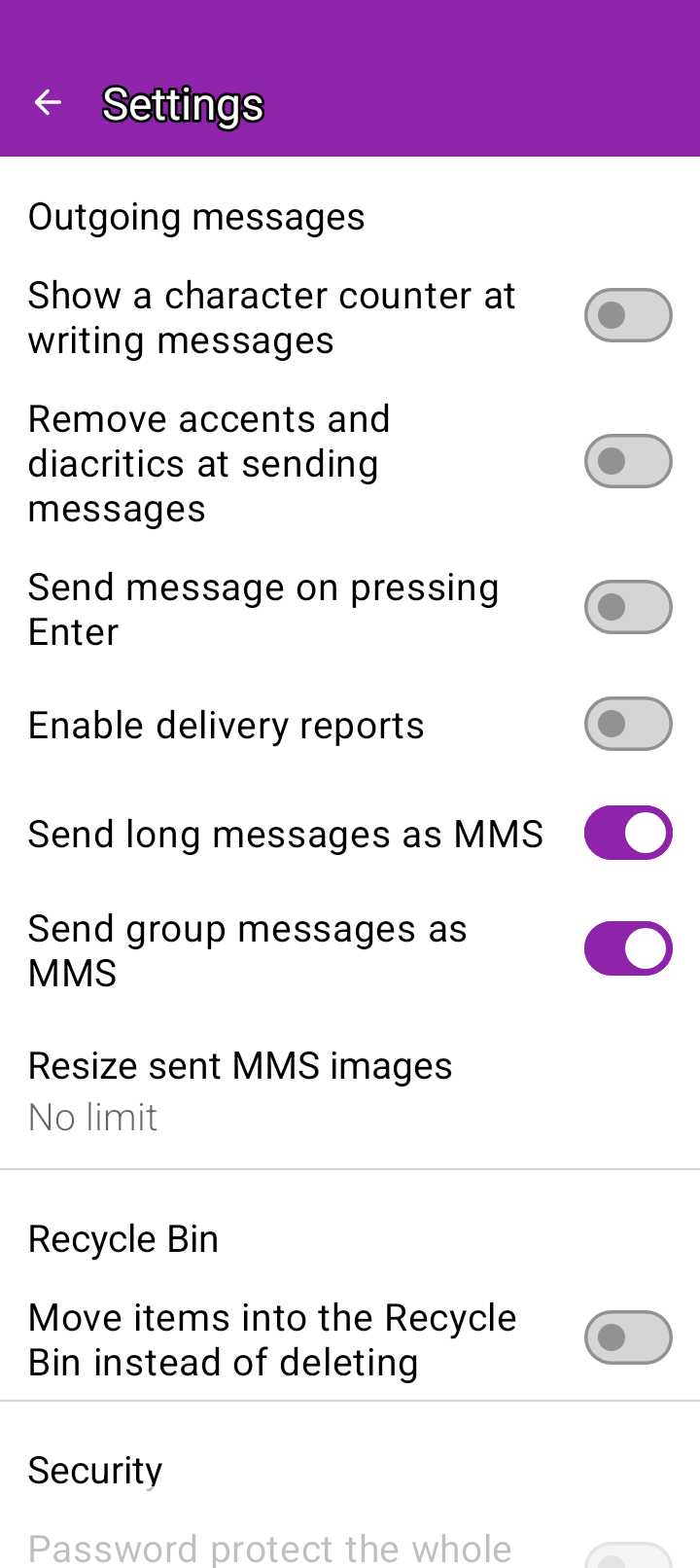
And also realize that we are limited by carrier media limits and we don’t have iMessage or RCS capabilities, so thus far any time someone texts me with too many pictures, it doesn’t go through. I’ve started using Signal with family members/contacts that are willing. More on the texting/media limits here: SMS works fine, MMS not so much on T-Mobile - #16 by bcbh
I hope this helps!
Sorry for the delay in reply. I went into 2 of their stores and they couldn’t get it working, and I reached out to no less than 2 of their 24/7 “experts” via chat. All interactions concluded that my phone “just isn’t compatible” despite having all the details, including my IMEI and my own technical understanding, at their disposal.
I would love to prove them wrong, though. I’ll try the guide you linked!
Boost Mobile: I was unsuccessful on activating their physical SIM card on the phone. After a lengthy call with their customer support, the reason it was a “foreign phone”.
The support agent was friendly and attempted multiple methods to activate the SIM to include reaching out to their technical support.
Agree with with mark17 here. I can’t get my phone to work on pure-talk. Picture messages anyway.
@rik
There is another AT&T based MVNO that is an option. Consumer Cellular should be corrected to show that it works and is exclusively AT&T.
Here is a conversation where Consumer Cellular discusses the transition from T-Mobile to AT&T. All new customers have AT&T service, though there may be legacy T-Mobile sims that are charged an additional fee and that Consumer Cellular is attempting to replace. To my knowledge Consumer Cellular has never contracted with Verizon. Reddit - The heart of the internet
After switching my sim from a previous phone, I can confirm that Consumer Cellular has been working for over 3 weeks with no issues. In the settings my SIM is listed as “CC Network” and I did not need to input any additional data to get it to function. I know that it utilizes AT&T because it says “AT&T” in the upper left corner of the lock screen.
Additionally, I did have a call with their customer service where the Brax3 device was discussed and tested. They were not able to identify it by IMEI, but I informed them that it was brand new and we both agreed that it appeared to be compatible. New customers signing up will typically do so over the internet and have the sim mailed to them. So even if Brax3 is not specified on their list it should be easy to order and functional.
In Eastern Canada ‘Eastlink’ cell phone service provider is not compatible with BraX3.
At the moment it appears ‘Rogers’, BellAliant’ and ‘Telus’ are compatible.
So still no att support?
@the.finisher222 – I’m curious about “…picture messages anyway”. Does that mean that you got phone calling and non-picture text messages to work? If so, how? I can’t get any of that stuff to work. Phone calling and text messaging whether SMS or MMS simply don’t work. I get the “you’re not connected to a cell network” error message, and PureTalk does not appear at the top-left of my screen.
Make sure your APN settings are correct
https://www.puretalk.com/data#android
It now works. Thanks! And I seem to be able to send and receive picture texts (MMS), whereas @the.finisher222 seemed to have trouble.
@rik I’m successfully using Pure Talk now.