Hi Everyone,
So I have this issue with my brax3 phone.
Yes, I know there are other topics on this subject, however, I’ve not been able to solve it on my own, even when I have followed the guidelines in other posts.
Here in Denmark, I have the company “3 Denmark” as my cell service provider. I’ve been using the default iode messaging app on my brax3 (Fossify), and I have also tried another message services that I was able to download from ‘Aurora store’ (Sarand).
Regardless of attempting to send a picture to an android or an ios based phone, pictures will not go through. Standard texts will however go through.
The sim card in the brax3 phone was previously in an iphone. Both imessage and facetime was deactivated on the previous phone, prior to the sim card being transferred to the brax3 phone.
Is there anyone out there who knows of a work-around to this issue?
It’ll be much appreciated.
Best regards, Daniel
I take it u have your providers APN settings on the phone?
If so and not working with reboot then probably the messaging program like u tried. I use this:
Hi Lazarus
Actually, I hadn’t even given the APN settings a thought.
I appreciate you reminding me of it, and I have now made some alterations.
This seems to have worked in regards to sending images.
Now, however, I can’t receive images.
Best regards, Daniel
I had that problem with the default text app. Using QUIK SMS fixed that!
Thank you Lazarus,
It is so weird, I think, that one text provider can manage to send/receive texts/images whereas others only are able to do one of the two.
Anyway, thank you very much.
Now I have got to figure out how to get a dictionary for this app.
Best regards,
Daniel
You’re welcome but sorry it is not 100% fixed. Maybe somebody else will have an idea!
Have you also tried speaking to 3 Denmark support. Maybe they have an idea on what could be wrong and advise
i dont want to sound stupid ! but my brax also would not send or recieve photos at first but i changed a setting and it work after that! and i have send to my familiy member in usa and photo whent thru , i dont remember exactly what setting it was sorry.
For MMS, you need a few things. One, correct apn. Two, correct mms server. Three, mobile data. If you’re on wifi and try to send an mms, it might send a message (because it’s smart enough to try), but it might not try to receive one (it should pop up a message asking if you want to download it, but I find that hit and miss). There should be a setting in the sim settings that is called “MMS messages: Send and receive when mobile data is off”, turn that on. If you don’t see it, likely something is misconfigured (I have it on my main sim but not my data-only sim, which makes sense because the data-only sim isn’t setup for mms).
Hi Daniel, I had that problem too and couldn’t find any way to fix it. I eventually found that the problem was Fossify messages so I ditched that app and am now using an alternative from F-Droid store. It’s called “Messages” by Saalim Quadri. No problems sending MMS now.
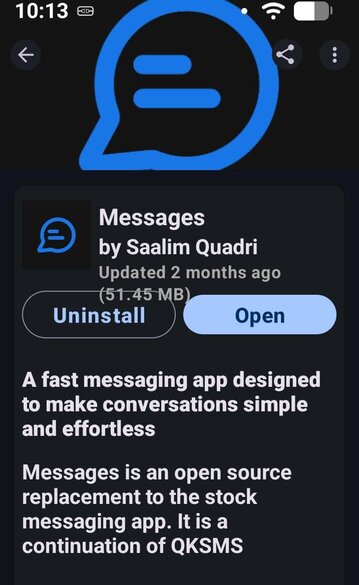
I noticed if wifi is turn off, the messages will send successfully with cell data turn on.
Hi Greenie,
Thank you, that one really helped. It is now possible to use both sms and mms to send and receive.
Thank you.
Best regards,
Daniel
Hi Josetann,
Thank you. I have fiddled with all those setting to no prevail. It wasn’t until I simply shifted to another app (the one Greenie mentioned) that everything seemed to click in place and now it works just fine.
Thank you.
Best regards,
Daniel
Hi Plamen,
Thank you for suggesting that.
I spoke to them, and they assured me that all the settings were correct.
I simply followed the suggestion from Greenie, and with a different app, everything now seems to be in working order.
Odd how things work out.
Thank you.
Best regards,
Daniel
Thank you. I have fiddled with all those setting to no prevail. It wasn’t until I simply shifted to another app (the one Greenie mentioned) that everything seemed to click in place and now it works just fine.
Curious if there’s anything that caused it to stop working. How was the phone initially setup? Did you do a seedvault backup from the previous phone?
I ask because it worked fine for me, until recently when I had to do a quick backup and restore (using seedvault) to fix a different issue (on a Pixel 8 Pro, but on iodeos like the Brax). I had all kinds of issues with the Messaging app, at first it showed the wrong message thread for the contact, but going into the message thread showed the correct thread for that contact…but sending a test message to that person actually sent it to someone else (I believe to whoever belonged to the “wrong” message thread that was showing up initially). I wiped all the settings and it seemed to re-index fine, but now my wife can send group chats but not receive them (we have verified MMS is working, and even a new group chat I setup works correctly). If it’s still not working in the next few days I’ll try to backup using a different app and restore it in case that works vs how seedvault handled it, and if all else fails I’ll start trying different apps.
Anyway, if we can find a common thread why it stops working for some people and not others, could help us fix the root issue.
I tried to find a setting and nothing worked. Like you, I was pretty frustrated because I couldn’t send out any MMS messages until I changed the app altogether from Fossify to that other one. I like to send GIFs once in a while and couldn’t do it at all. Just be sure to check the size limit on sending and adjust if it’s too small.
This topic was automatically closed 14 days after the last reply. New replies are no longer allowed.