Exactly, the password won’t authenticate, it’s not that the phone can’t find the router.
If we can all provide the needed information and wait for a fix that way the developers spend most of their time resolving the common issue we all have and less time answering our ongoing questions.
1 Like
For those that need wifi to download the updates, why not connect your phone to the router via an Ethernet cable to get an internet connection?
Obviously it will not fix the wifi issue but you’ll have the update.
1 Like
solid point
The following are attempted combinations on my router. Interestingly, there appear to be different error messages depending on whether WPA or WPA2 is selected. Don’t have WPA3 on this router to try out…
TP Link C5400
Overall Setting WPA/WPA2-Personal
Running on 802.11b/g/n mixed.
WPA2-PSK with AES cipher - Saved/Check Password and try again.
WPA2-PSK with TKIP - Saved/Check Password and try again
WPA-PSK with AES - Saved/Disabled
WPA-PSK with TKIP - Saved/Disabled
Running on 802.11g/n mixed Saved/Disabled
WPA-PSK with TKIP -Saved/Disabled
WPA2-PSK with TKIP -Saved/Check Password and try again.
WPA-PSK with AES - Saved/Disabled
WPA2-PSK with AES cipher - Saved/Check Password and try again.
Running on 802.11n only
WPA2-PSK with AES cipher - Saved/Check Password and try again.
WPA-PSK with AES - Saved/Disabled
An ethernet cable attaches to a computer, not a phone. I can plug a USB cable into the router (which charges the phone) but it won’t connect to the internet because of the password error problem.
Not true.
You can attach an Ethernet cable directly to a phone.
I have done it myself many times.
You need a USB 3 to 1000 mbps gigabit adaptor.
Plug the end of the Ethernet cable into the adaptor. Now you need a USB A to USB C adaptor. Plug the end of the Ethernet adaptor in to the USB A to USB C adaptor, and then plug the end directly in to your phone.
You now have internet.
3 Likes
“You can attach an Ethernet cable directly to a phone.” Wrong. It is a contradiction to say this because you have to add USB adaptors, so it’s not a direct connection.
True.
However, my point was to demonstrate that it can be done.
Just trying to help those that need a connection to do updates.
I shall now keep out of this discussion.
1 Like
I upgraded to IodéOS 6.6 (July 30, 2025).
No change with wifi, WPA2 Personal still doesn’t work on my SFR AP.
I also experimented to create an hotspot on my computer, with nmtui command.
I selected WPA/WPA2
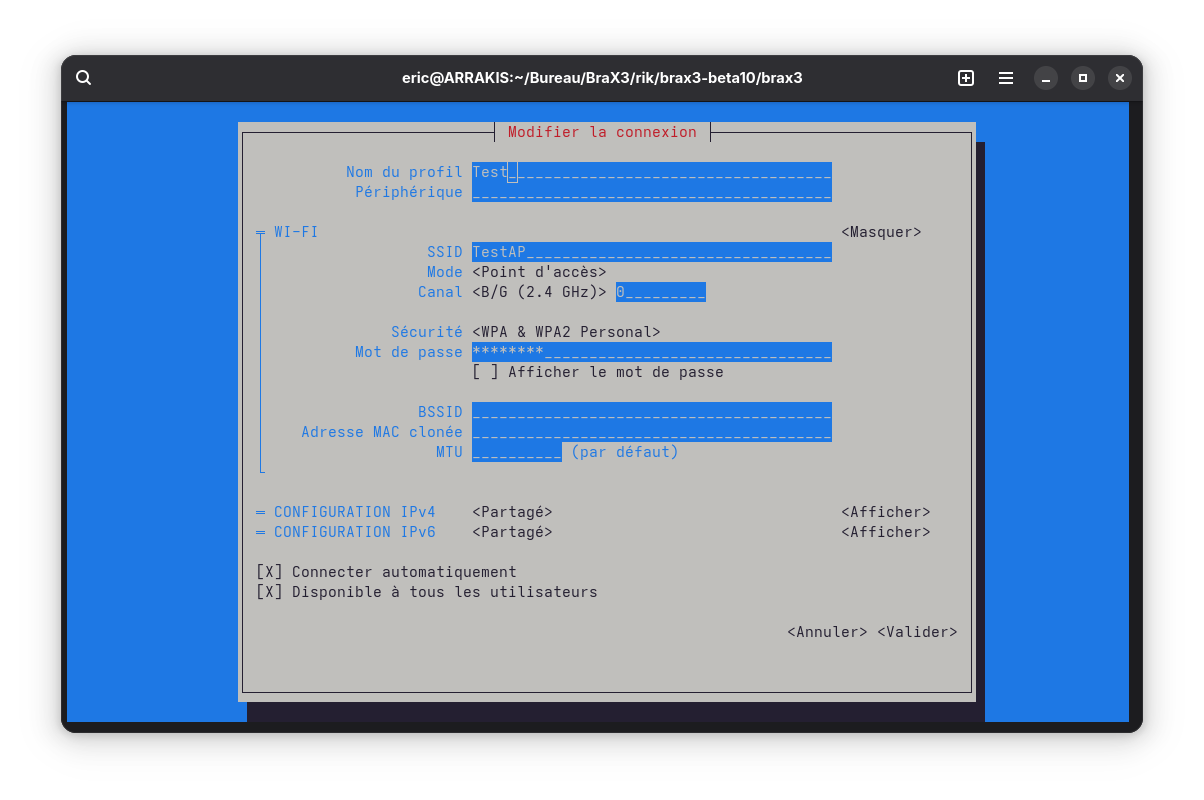
In this case the BraX3 was able to connect to the hotspot, but it detects it as WPA3 ?!?
2 Likes
Thanks for your help Beircheart. I wondered how you were making that connection. I didn’t know you could do that, but I’m not surprised. I’ll have to look for one of those. Appreciated!
I was able to create an internet bluetooth connection from my old phone to Brax3 for a day, but the next day I couldn’t get it to work at all. I tried “forgetting” the connection, restarting both phones and router, all the usual stuff. Nothing. The only thing bluetooth will let me do now is share contacts and files, but not the internet. I’m stuck on data until I can get the issue resolved. I also have not been able to connect to other wifi using different routers. As I’ve said previously, this wifi password authentication issue seems to be a problem connected to Android 15 as it has been reported in multiple forums online with a variety of phones and routers.
woah
This morning both the Google home AND the HELIX AP worked. not sure why it didn’t before..
you can mark those as valid in the table !
next is mkrotik
1 Like
Hey! Not going to complain but I am a bit more baffled. Can you confirm what wifi security settings are being used on those devices? And what else changed (if anything)?  Maybe the
 6.6 update solved something after a reboot? Or maybe you “forgot” the saved (but not working) connections and did a fresh attempt at connecting??
Also, can you list the exact model numbers for those working devices?
BTW for all users testing around with different router / AP configurations (WPA2 only instead of WPA or WPA/WPA2, for example): Whenver trying a different configuration, also please delete / “forget” the bad connection from before and reconnect from scratch as if for the first time. This may possibly help. Probably not but it is the best way to isolate / confirm the failed connections.
1 Like
well i had beta from ota beta, i shutdown phone for the night, this morning it worked !..
not sure about the other routers ill check in afternoon
Did you reboot it yesterday and it didn’t work? Maybe your APs needed 24h to drop the lease?
1 Like
My Brax3 connects to all Wifi hotspots except my own personal wifi home router. I cannot access the internet at home on my Brax3 with Iode OS. All computers and mobile devices in my household connect to my home router. No visitors have ever had a problem connecting to my home Wifi router.
Home Wifi Router
Model:Smart RG SR516ac (configured for Teksavvy, the service provider)
Brax3:
Iode Version:6.6-20250723-brax3 (most up to date version)
Android Ver: 15
No SIM Installed, I have no cellular voice or data service.
No VPN configured.
2.4 GHz
Security:
Open Connected
Shared (WPA) Connected
WPA2 N/A (I don’t have a radius server)
WPA2-PSK, AES Message “Could not connect to Wifi Network”
WPA2-PSK, TKIP+AES Message “Could not connect to Wifi Network”
Mixed WPA2/WPA N/A (I don’t have a radius server)
5GHz
Security:
Open Connected
Shared (WPA) Connected
WPA2 N/A (I don’t have a radius server)
WPA2-PSK, AES Message “Could not connect to Wifi Network”
WPA2-PSK, TKIP+AES Message “Could not connect to Wifi Network”
Mixed WPA2/WPA N/A (I don’t have a radius server)
I created a guest wifi for my home router. The results are the same as above.
Things I tried:
Router Rebooted: No improvement
Brax3 Phone rebooted. No Improvement.
Brax3 forget and reconnect to Wifi Network: No Improvement
Brax3 Manually added Network info via “+ Add Network” in Iode Internet settings: No improvement
Reset Brax3 Mobile Network Settings: No Improvement
Reset Brax3 Bluetooth and WIFI Network Settings: No Improvement
Brax3 Disabled Bluetooth: No Improvement
Brax3 Disable NFC: No Improvement
Brax3 Connectivity Check Disabled: No Improvement
Brax3 Cycled Airplane Mode off then back on: No Improvement
Brax3 Change Wifi Network setting between randominzed mac and device mac makes no difference.
Changing the Brax Metered Wifi setting between Meterd/Not Metered/ Auto makes no difference.
Changing the Brax Privacy Wifi setting between Send Device Name /Do not send device name to network makes no difference.
3 Likes
Added to the Brax3 wifi connection issues chart