Is it possible to dual boot Ubuntu Touch and Android on the BraX3?
Dual boot is not available on the BraX3 yet. The goal was to work on it once UB Touch port is completed and production-level ready, but it’s stalled at the moment.
How can we help?
Is the bounty program I’ve heard about planned for the UB Touch Port of BraX3?
It is, yes. We need to piece together a few more things infra wise, and we should be ready to kick it off.
Now that I have my UT BraX3 back to iode’, I wanted to try this to see if it lets u change slots using fastboot and it seems to. I’m not real sure how to put an OS into the additional slot to see if it will change there but we can inquire about what is there. I took a screenshot…I think u first have to unlock the bootloader:
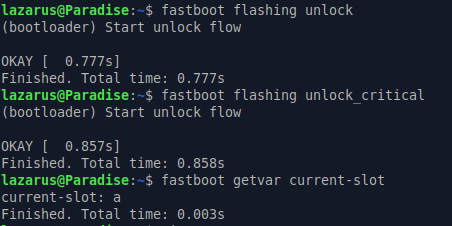
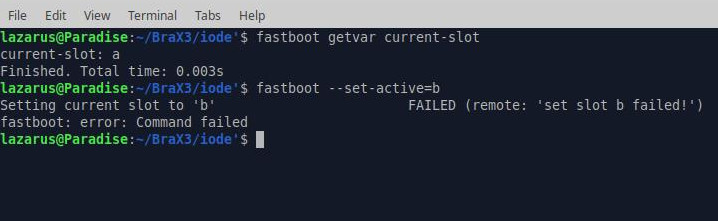
I will install Lunar OS and see if that changes.
Unlocked bootloader with Lunar OS installed gives identical info: installed on slot A and setting slot to B fails. We need a new recovery to that I think! 
On a desktop PC I am able to install UT into slot B and Lunar OS is on slot A.

I found some things out that would make dual booting possible but it looks like the recovery with Lunar OS disables the secure boot that is on the BraX3. It is called fastbootd. When fastboot connects with this rather than the bootloader then u are able to change slots. I was able to install all 3 UT files into slot B and get an OK but I could not get it to boot into slot B. It kept booting into slot A which is Lunar OS. It says the storage space here is still 237 GB and not half of that.
U get there by either adb or using buttons by going into the recovery screen when powered down hold Volume down and Power Button at the same time and then enter fastboot. Then using a fastboot connection on your pc u can change over to slot B.
If u are in adb type this:
adb reboot fastboot
I’m just not sure how to boot slot B! It should happen if slot B has already been made active!
This is what I did with Ubuntu Touch. It installs OK into slot B:
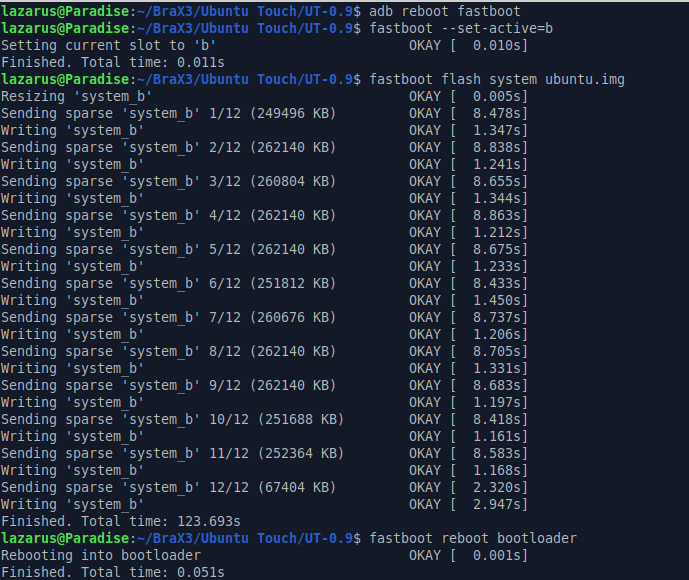
Now when it reboots it doesn’t go to the bootloader but into Lunar OS. I used adb to get it to the bootloader and installed these:
fastboot flash boot_b boot.img
fastboot flash init_boot_b init_boot.img
I then did this:
fastboot -w
fastboot format:ext4 userdata
fastboot reboot
Then it boots into Lunar OS again rather than UT!