The current kernel on the UT is 2 years old-5.15.148. Maybe present day Sim cards would work with a kernel upgrsde?
Brave AI gives instructions on cross compiling and flashing:
Build Ubuntu Kernel Cross Compile
Cross-compiling the Linux kernel for Ubuntu Touch involves setting up a cross-compilation environment on an Ubuntu host to build a kernel compatible with ARM-based devices running Ubuntu Touch, such as the Nexus 4 or BQ Aquaris E4.5.
You have to get the dmesg because the system talks to the binary drivers of the modem through the HAL, something isn’t tuned correctly in this process.
When you notice messages related to modem/SIM errors/warnings then you’ll know which direction to go and where to look. It could also be something very minor that could be fixed easily. Comparing the messages between a boot that recognises the SIM and one that it doesn’t would give you much information, maybe it fails to activate the modem altogether due to some condition that is fulfilled randomly like when you are reading freshly allocated memory without deleting it first.
The kernel compilation is very advanced and you probably need many tricks to install it but I don’t think it’s correlated to the modem which is configured very abstractly by Linux.
It has directed you to compile an OnePlus Snapdragon kernel, you would need a Brax3 Mediatek one but I can’t see anything in the repositories. You need both the right kernel source and the configuration file already present inside your device.
You could follow the changelogs, Index of /pub/linux/kernel/v5.x/ of the kernel at least for staying on 5.15.x, moving to another kernel like 6.x introduces many complications. One of them is that the configuration options change continuously and since they do not exist in the previous configuration file you’ll have to decide on your own how to configure it.
Even if something related to the modem has been introduced it would be an Ubuntu Touch specific patch regarding the mobile SoCs. The age of the kernel is not important, UBports has shipped an LTS kernel on which they have been working for a long time and they do not expect to encounter bugs of future versions.
It should be at least at /proc/config.gz and can be extracted to a file with
zcat /proc/config.gz > config
this is a cat command for compressed files.
/proc is a virtual filesystem that points to most of the information of a running system in the kernel, it contains one directory for every process named with the PID of the process.
For example /proc/cpuinfo contains all the information for the CPU cores.
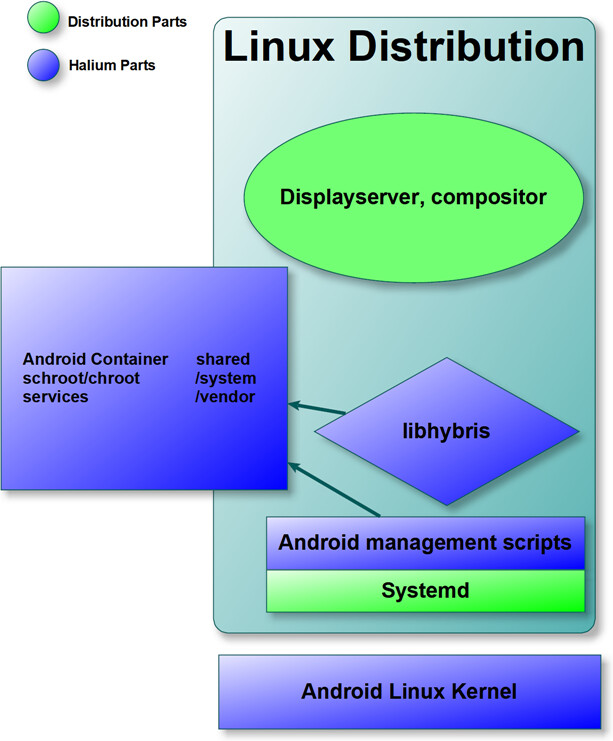
As you can see in this diagram at halium.org, the hardware abstraction is complicated and demands an Android kernel and various Android services that talk to Mediatek’s binary blobs, somewhere in this stack the communication with the modem is not stable, everything else happens internally inside the modem which is a 2nd computer running Linux and Android trusted environment, the modem will automatically recognize the SIM.