Morning good Brax brats 
1. I am wondering what app(s) are you using to screen record.
- what made you pick this over other?
Thank you, to all who reply 
Morning good Brax brats
1. I am wondering what app(s) are you using to screen record.
Thank you, to all who reply
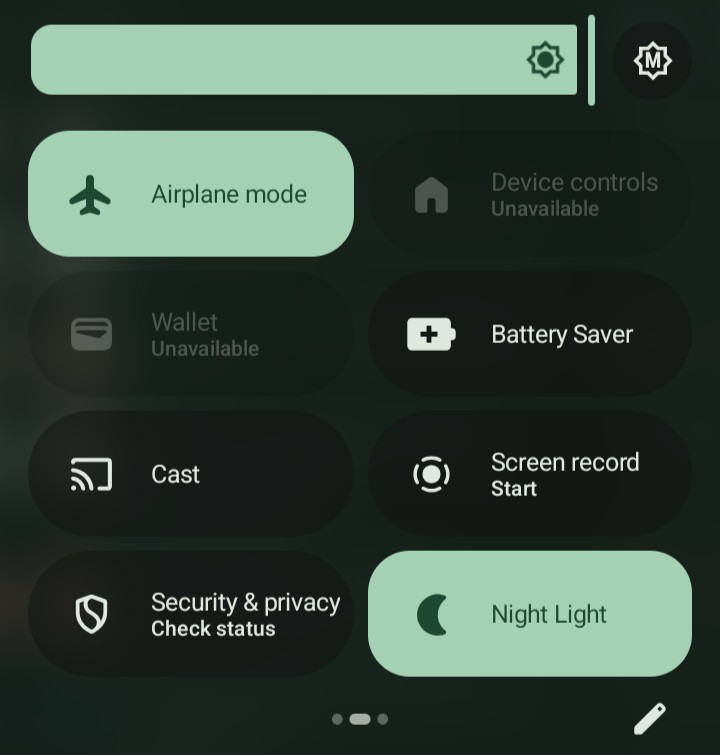
Slide down and search for the screen recording in settings tiles.
I have only seen the sound recorder. Not video screen recorder.
But was looking for whats been others experiences for any “screen” recorders peeps have used.
There is a screen recorder too, slide left and right to change tabs and if it’s not there hit the pencil.
Use as much as possible native mechanisms so that things work smoothly wihtout giving permissions to 3rd party apps.
I’d also recommend to use the native screen recorder if you’re using a BraX3. It’s open-sourced. And the less apps you run the better in general.
If you’re using a different device, I’d advise that you find an open-sourced screen recorder through f-droid or other repo.
Hm. Can you show me image of what the app icon should look like. Im not seeing it. Thank you
Dang……when I pull down, I only have 4 options showing. Screen record is not there…
you can see at the bottom that I’m in the 2nd tab of the 3, slide left, if it’s not there hit the pencil to edit the tiles and you’ll find more tiles.
slide once more down to see more tiles, initially it shows only 4
OHHHhhhh!!!
 I needed this last bit of direction to get me there!!. This is my first Android. Apple for 14yrs rottet my brain a bit. I had no idea to double drag down from THAT spot for settings.
I totally miss understood your first suggestion, for the apps icons, and was a tad embarrassed I couldn’t figure it out…
This made my morning. Big thank you george!
I had also been tricked initially and I thought there was no screen brightness setting as I was remembering but I figured it out accidentally.
I appreciate the share