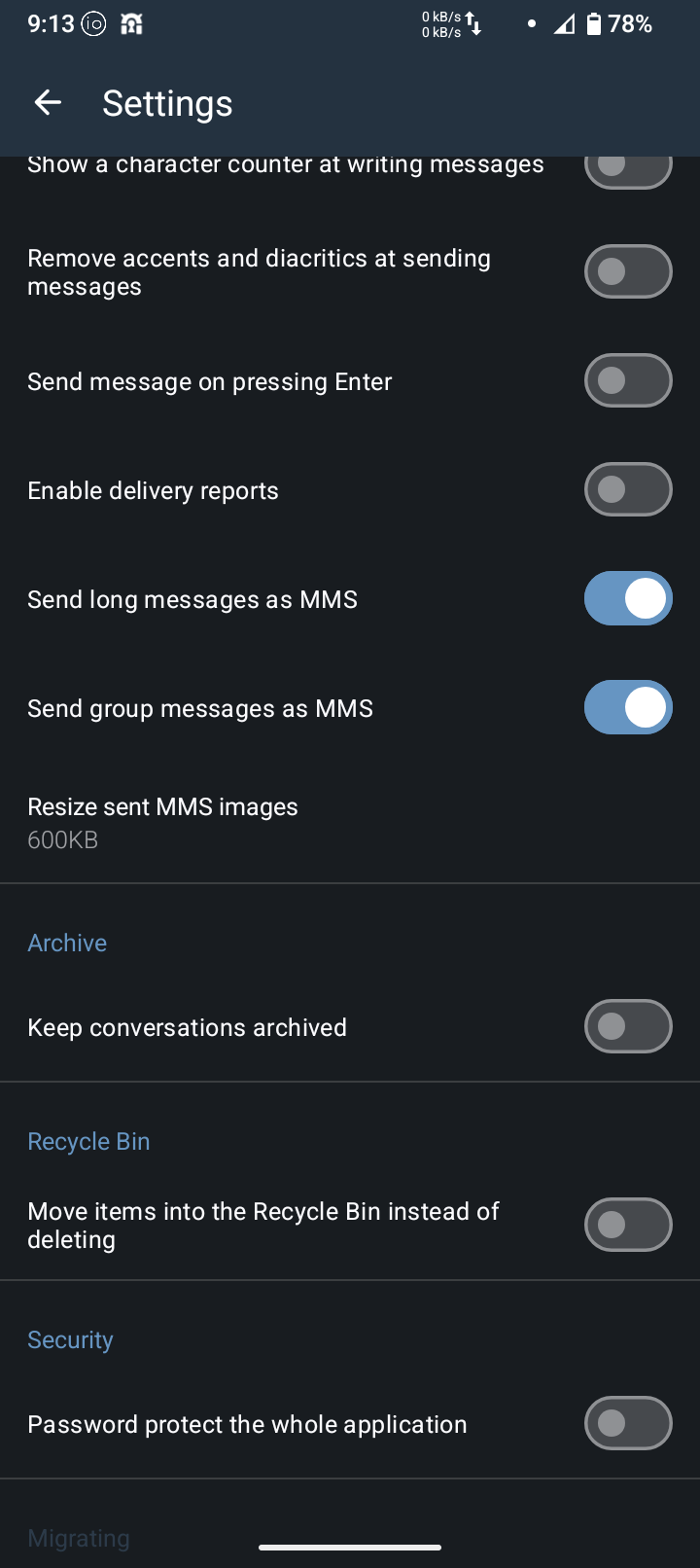
Fragman, when you say that you’re “in the configuration menu” and you noticed to the toggle for “MMS on carrier”
Which menu are you referring to?
Fragman, when you say that you’re “in the configuration menu” and you noticed to the toggle for “MMS on carrier”
Which menu are you referring to?
bcbh hope your day is a Bless one. Ok you go to settings > network & internet > sim.
Now I just realized this and I apologized, if I missed let everyone in the wrong direction.
That been said, Once your there you see two toggles: one for the carrier and one for mobile data. This is what I got it wrong.
If you turn off mobile data and go to up to the carrier press it and go down the menu. You will see a toggle for “MMS Messages”. It should be turn on.
Like I said I apologize if I miss let anyone, not until you ask where was the menu, that I realize my mistake.
Still, once I did this MMS started working for me. The quality is, well… not something to write home about, but it works.
Hope this helps
Thank you, it works very well. Not perfect, but we have function until there is a real fix.
I am using Mint through T-Mobile
Thank you for this @fragman204 !
Not sure where you are located, but if in US, practically every carrier that is supported is a T-Mobile or virtual carrier under T-Mobile. So the who 300K limit on pics and whatnot really puts a whammy on the whole MMS thing. And becasue these are de-goggled devices, the RCS stuff goes out the window too.
Personally, I’ve been using SimpleX, and have been able to convince a couple of my “normie” family members to load it. It works well, and supports voice and video calls as well. Just an option to throw out there… and requires NO personal info.
This happened today, no MMS. I did not make any changes to the Brax3. So, I did this and it started working again.
I uninstall the sms app (I’m using the pre-install app). Rebooted, re-install the same sms app and rebooted the phone again. This got the MMS working again.
I don’t know if the problem is iode or the carrier(T-Mobile). It’s strange that the process I mentioned before is the one thing that make it work.
Not denying that you got it working again, but I don’t think any uninstall /reinstall of the app itself had anything to do with it. I wonder if a simple reboot was the solution in this case, as possibly the mobile network stack needed a kick?
I was fortunate enough for Brax to authorize a replacement of my phone. We’ll see how the new one works.
Roger
If it happens again I will do just that rik. 
I am also unable to send group texts and photos. I’ve gone through everything in this thread and all were set correctly. MMS is on, iMessage deregistered. I have Patriot mobile and my Brax3 is on T-Mobile. But it’s not a T-mobile problem as it works properly in the old phone.
I too went through all of that. I reset the phone twice to no avail. This sounds like an isolated issue as so many others aren’t having these issues.
My replacement phone is being processed now and I’ll hopeful that it truly was an isolated issue.
I cannot save images sent to me via MMS text messages through the default Messaging app (which I believe is Version 1.2.3 of org.fossify.messages). I display an image, press the “Share” button at bottom center, and the only options that pop up are apps, like Proton Mail, Messages, Maps, Bluetooth, etc. I see no option to Save Image or Save to Gallery. What am I doing wrong? As a stopgap, I display the image, take a screenshot, and use that. But I hope you’ll agree that’s not ideal.
I was able to save pictures sent to me via MMS by long pressing on the picture and at the top of the screen you will see a trash can or save disc or three dots. click on the middle icon (looks like an old floppy disc to me  ) and then click on the blue save button at the bottom right of the screen. The picture saves to my Brax3 gallery that came on the phone.
I get this all the time with a Pixel running either Android or GrapheneOS. Theoretically starting with Digital AMPS (D-AMPS) and later followed by GSM, CDMA2000, CDMA, TDMA and later Generations, the SMS was required as part of the signaling and supervisory data that controlled and evaluated the calls. In other words SMS was an intrinsic part of cellular telephony. Today SMS is used as a marketing tool to increase profits. MMS was included in stages implementing changes in the GSM systems. I never understood why the SMS messaging of LTE, VoLTE or Gen 5 ( all of the versions) is not reliable. I can get SMS messages days later. I no longer trust them. SMS does have good reviews with satellite phones and one way pagers.
The main carrier I use with terrible SMS services ( a big Joke) is T Mobile. First responders are supposed to be using ATT mobility for their SMS emergency messages.
I’m on Consumer Cellular (AT&T network.) Had to add ereseller APN to get on the network (with the aid of Consumer Cellular help.) So voice and data now work. However while can send and receive SMS, cannot send or receive MMS images. I also tried switching to google Messages and RCS, but that doesn’t work either. It keeps saying it is trying to verify the phone number.
Update on MMS. My voicemail was not working either. I chatted with Consumer Cellular support and they ended up reseting my voicemail server which required selecting a language and entering a new passcode. That got voicemail working. I hadn’t mentioned MMS problem. But tried sending myself a image from another device and now can send and receive MMS images. So MMS now works for me.
That’s very interesting. Thanks for the update!
I’m on mint mobile which is t mobile. I use these settings on fossify messages and it works.
I came from a oneplus open and it would not work at all, i had to go into my google account and deactivate rcs messaging and then it worked perfect. Got a new number and it just worked since it was never hooked up to rcs.
I will almost guarantee your problem is that,login into you google account on a different device and turn off rcs or if possible delete that number from the google account.
I found that when I ask my carrier to change my language preference to Tasmanian ( palawa kani), the MMS works fine. ya pulingina!