So, As I had stated in a previous post last week regarding YT issues, we are now seeing those issues system wide. In an article I read yesterday which was confirmed in a beta update of FreeTube on desktop lynux, YT is requiring it vids to be viewed with the adds upfront. Anything that attempts to load a vid with an adblocker etc… will not be allowed to run. Thus any browser regardless of vpn or not that is running adblockers will be denied. FreeTube is getting around this byletting the adds run on there end before loading the vid to it app. I just watched several sucessfully. it takes 30 seconds to 1 minute before most vids will load but they do load ad play fine. All the front end and back end apps for android have yet to catch up on this. I have new pipe, pipe, and libretube on the B3 and none of them will work. You can open invideous in your browser and play with instances then search individually for creators/vids and it will work but it is a bit cumbersome.
The latest app that replaces NewPipe is PipePipe but I’m using YTDLnis which is a GUI for yt-dlp and I download everything to be played on VLC, it also provides a terminal where you can run all the yt-dlp commands you like.
yt-dlp can be updated from within the app without updating the app itself
Concerning age-verification in the UK it is circumvented with VPNs but some users may have to select a very special server in some French colony or whatever.
I believe that soon every access to the internet will go through biometrics globally, until then it is better to let the big corporations feel what “free market” is and stop using them, most creators are using Rumble, Bitchute, Odysee already.
yt-dlp works fine both on desktop and on Brax3 with YTDLnis, certainly Google tries to put obstacles continuously but they are circumvented, in case you have a temporary problem you can use the latest nightly build where patches are applied continuously
youtube-dl has been deprecated in favour of yt-dlp
So the VPN only works for me if I use a US location
My experience on using video platforms with BytzVPN…
LAPTOP running LINUX and Brave browser:
– Cannot use FreeTube at all (VPN or no VPN) due to API errors
– GrayJay works with VPN, sometimes it asks for login or has errors during playback. Changing VPN location profile sometimes helps
– YouTube works with VPN but has ads
– All other platforms like Rumble, Odysee, Bitchute work with VPN and no ads
Brax3 with BytzVPN:
– Rumble works but has ads
– Odysee works with no ads
– Bitchute works with no ads
– NewPipe only works if VPN is off
– PipePipe only works if VPN is off
– GrayJay only works if VPN is off
– YouTube (not installed on my phone so can’t say)
Thank you for that very good list.
Though I have tried all of those, what you described is basically what I have experienced.
Re YouTube, I understand there are three options.
- Use a browser without logging in with VPN off.
- Download the app. It works without logging in with VPN on. Sometimes it asks to log in. After canceling and retrying, it works.
- Set up an account and log in with VPN.
I don’t want to set up an account. So I did #2.
I’d like to hear pros and cons of setting up an account. I don’t have any Google accounts.
I think it’s going to get more difficult, and a lot of the “alternative” apps for viewing videos are going to stop working due to demands for login to verify age. Looking forward to hearing potential solutions going forward.
Can anyone explain to me why apps like NewPipe, PipePipe, and GrayJay work with a VPN on the PC (some or all of the time) but will not work with a VPN on a degoogled phone?
I’m using newpipe with a VPN. Very rarely, a video wouldn’t play because my VPN is ON. I noticed this happens with videos that have any form of georestriction (e.g. Formula 1 youtube channel)
I downloaded Newpipe but it told me I couldn’t use the app without giving them access to my pics and videos.
Where did you download it from? That never happened to me.
Aurora Store. It was the first permission it asked for, IIRC.
Edit: Just checked and it wasn’t, in fact, Newpipe. It was Newpipé.
Lol
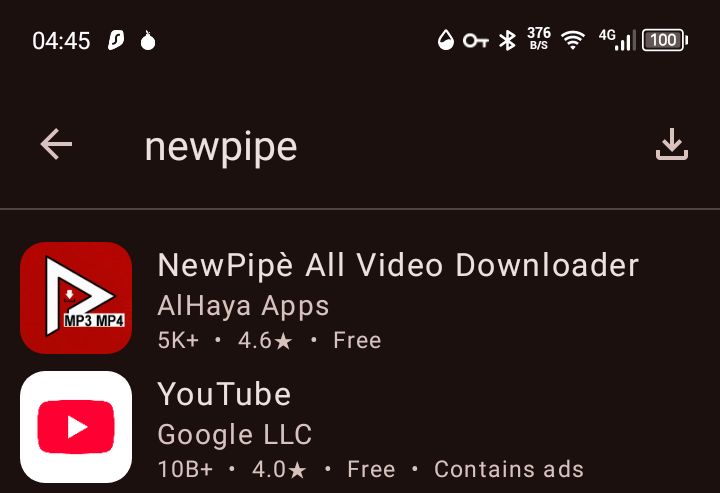
So I guess it’s not on Aurora Store anymore?
Wow, that’s pretty deceptive.
NewPipe (from TeamNewPipe) is available from F-Droid. Why not get it there in the first place?
Will do.
But I was having issues with F-Droid yesterday
@404usernotfound Try Pipepipe from F-droid and YTDLnis from https://YTDLnis.com, it includes a terminal for more advanced use of yt-dlp
I got newpipe and Ill try pipepipe, but I’m not sure I’m advanced enough for the anything advanced 
What advanced uses are there that I might learn about?
Actually, you gave the link so I’ve downloaded it. 
@404usernotfound YTDLnis works like NewPipe but it is based on yt-dlp, it will download videos and audio from most websites without a problem, press “More > Terminal” and
yt-dlp -F [video_address] to see the formats available,
yt-dlp -f [format] [video_address] to download the specific format you want,
the automated GUI is enough but you can also instruct it to combine audio and video or use your account or a VPN etc, see more here GitHub - yt-dlp/yt-dlp: A feature-rich command-line audio/video downloader,
yt-dlp can be updated independently from “More > Settings > Updating > Update yt-dlp”, when some website stops working an update will be available soon to fix the problem.
Thanks. I’ll look into it.
Bravepipe (a fork of Newpipe) is another alternative, which you can also use with Bitchute, Rumble and others. I have tried it and like it so far. I have it setup to do updates in Obtainium. I don’t have my Brax3 yet, hopefully shipping this week, and this is on a Pixel 9 with GrapheneOS, but I am sure you could do the same setup on Brax3. I had problems with Newpipe a few months ago when I first tried it and uninstalled it then as a result. Then found this a couple weeks ago.
About Bravepipe: “Due to restrictive project policy, the NewPipeTeam refuses to add platforms that they find offensive. This fork (BravePipe) will not be as restrictive. As long as the platforms work in the spirit of free speech, they could be integrated.”
The Aurora App looks like a trojan. Very deceptive.