ATT had issues yesterday and I believe did update, today “NO SERVICE” on phone. Called patriot mobil, no reported att issues, spent hr plus on T/S with them. They are sending a sim card, however, after hanging up I got my Caylx pixel out, put this sim card in, it works fine. Putt card back in brax phone. No service…
So either Brax 3 phone crapped out -or- ATT has discontinued service to brax 3 phones.
Help. I need a phone or a refund or whatever. Thanks for your attention.
Thanks for the help, my phone (Brax 34) has NEVER gotten 5g, or even normal wifi speeds (There is a post for that) but at least its working again…Thanks
I am having the exact issue. My phone just quit connecting through mobile data and any kind of cell tower. It says that it is only available for emergency calls. I am also with Patriot Mobile. I hope this is not a brax issue. Maybe ATT is blocking privacy phones? @plamen
There is a setting that can limit the phone below 5G. If it’s not that maybe it’s a missing APN of type IMS that nobody seems to have except for me though I’m not in the US and I don’t know whether it works the same way there.
For WiFi try the 5GHz band, it should give you more speed but it seems to be some problem in the drivers which can be fixed by Mediatek only.
@plamen we need a pinned guide for the specific issue, it seems random but it has been reported by several users and creates disruption in the use of the device
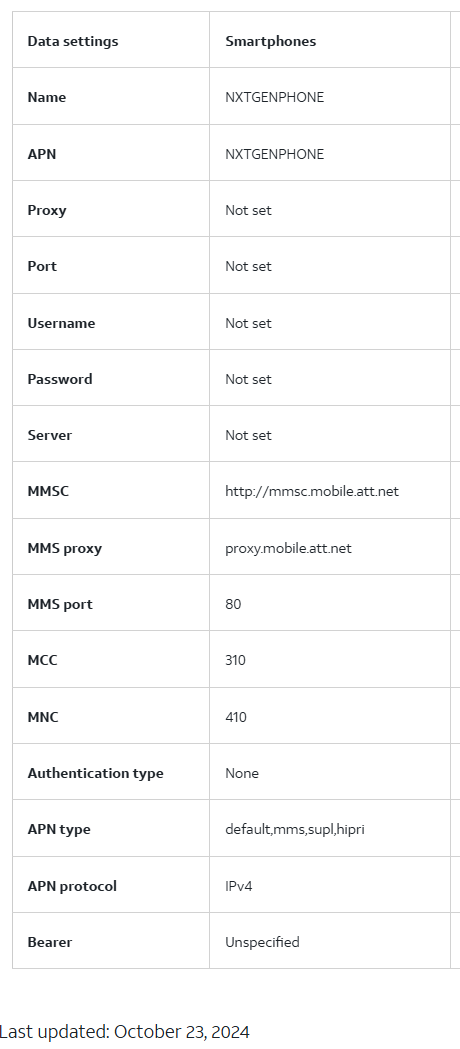
So follow above instructions to fing access point settings in Brax phone, Also search ATT APN settings on internet. Create a new APN setting in phone and fill in the blanks using ATT’s listed APN settings. There are 2 choices, one is for 5G and didnt work for me (Phone still said emergency calls only), the second, worked for me (No 5G)
wouldn’t it be good to have a section where APN could be pasted for others to see ? If you have a carrier and brax 3 with apn that works, paste settings for others to see.
I found the Access Point Name settings. I compared them to what you list here, and they are pretty much the same. Mine doesn’t have some of the fields you are showing for MNC, and where it says “Bearer", that must mean the Network Type. Are you saying to create a new one? I edited one to make sure it included what you suggest, but it still isn’t working.
I think it is important to know that I have had this phone since it first shipped. I was an early adopter on Kickstarter. The phone has worked fine for me until yesterday afternoon. Something must have changed in the way the towers are allowing it to send/receive signal. I just want to be clear, this isn’t a setup issue, like I just put my SIM card in a new phone and it won’t work. Everything has been working, and now it is not.
I appreciate the help of the community on this, and since it is not an isolated issue, hopefully an update can be generated soon.
MNC is the network code which along with the MCC country code should be filled automatically, probably you are missing that because you are not connected to the network.
I am just a brax 3 owner also. 3 days ago, my ATT AIR (Its internet) went out, and it showed ATT was down, phone was also up/down. Next day internet was blazing again, but phone was “Emergency phone call only”
Note that I have had my phone for a month or two, and this just happened with NO changes .
I started this topic. I found (With help) that others had the same issues. Some reported that they actually had to create a new APN (The plus sign next to the 3 dots at top of screen in APN area) name it as stated, fill in blanks as stated. What I inserted was right from ATT web site. Things missing I didn’t fill in either. be careful as the order of things aren’t the same from ATT and the phone, so if you don’t quickly see something, look above in your phone list as it may be out of order (I know at least 1 item was) meaning you could miss it.
If after creating a new APN, you still have the same issue, let me know and I will attempt to do a screen capture and upload it for you.,
Since your AT&T router went down it means that they reset something on the network and a reset is needed on the phone too, probably due to the peculiarities of Brax3.
Understand, my “Router” is a new “Air-WIFI” tower is 20 miles away. Only for internet, my phone service is ATT thru Patriot Mobile, and a separate service. However, my thoughts and yours are aligned in that this probably was something created by ATT. I can not prove that, but i believe it.
I have contacted Patriot Mobile, and informed them of the fix, so they may tell others calling in with same issue. I also strongly suggested that they let their ATT counterpart know they created this problem. …
Now if we could only get 5g working (And the wifi speeds.=, and … well one bite at a time.
Thanks for your help george, i will be checking wifes pixel against my brax 3 apn settings since the pixels (Same sim) get 5g and brax 3 never has.
This worked!!! I created a new APN with the information from the screenshot above, saved it, and then selected it from the list of APNs, and my phone is back to normal. I can’t thank the community enough! Thank you, thank you, thank you.
So as promised I did this test using 4 phones with 2 sims , 2 pixel 6a’s / 1 Samsung s9 / 1 brax 3
Sim card now in brax 3 installed into s9 ……………………… S9 gets ATT 5g
Sim Card from s9 into Pixel(s) 6a…………………………………Pixels 6a get ATT 5G
Sim Card above installed into Brax 3 ………………………… Brax gets ATT LTE
All phones same location / towers / same sim cards, and APN’s identical , even made a manual new APN for the brax 3 (And 1 pixel test) straight from ATT website, and same results. Brax 3 does not get 5g.
I know someone said they had 5g on their phone. I would like to point out that when 5g first came out , phones from ATT and Verizon both showed 5g icons but testing proved it wasn’t 5g,
I’m just saying this is one possible reason why a 5g icon showed up. Also note that I drove 30 miles to St. Peters Mo, and same results in testing.
Brax 3 Wifi (ATT Air speed test shows 213 Mbps)
S9 samsung download …………..141 Mbps
Pixel 6a download………………….185 Mbps
Brax 3 download…………………. 63 Mbps
OK, as a retired engineer I feel pretty good that these issues are not ATT service, or routers and settings etc. It’s the phone.
What is the plan to get this fixed ?
I could never get the brax to work on att. Message essentially said your phone is not approved. I just put in a 7 day test with mint and tmobile, everything working great.
Last I read I don’t believe brax has entered into an agreement with att yet.