I’ve tested this with 3 USB-C hubs. The hubs are the kind that allow passing through charging while providing USB ports and HDMI out like this one on Amazon.
I use them to charge the phone while connecting it to a USB to ethernet adapter to download youtube videos, access a flash drive for seedvault backups and hook up the phone to a USB switch with keyboard and mouse connecting to many devices.
When a power source to charge from is plugged in to the hub, then the phone only charges and none of the USB ports work usually. When the power source is unplugged from the hub, the USB ports work. If everything is plugged in at the same time, it is inconsistent whether the phone will enable the USB devices or ignore them and charge.
Has anyone run into a similar problem? I’m not sure what further steps I could take to try to make this work on my end. Is this something the OS developers can fix in a future software update? If not I might have to return the phone.
Thanks for the suggestion. I just tried checking this. Everything is plugged in to the hub, and when I plugged it in to the phone it began charging and ignored the USB devices. There is no notification giving me the option to enable USB data transfer or anything like that. It is behaving as if I had just plugged it in to a plain charging cable.
Yes but did you go into the USB settings and specifically change it to file transfer or similar once connected, same as you would do connecting to a computer?
There isn’t any pop up notification - I think a notification appears in your notifications but just says USB connected - the Android default is always to charge only for security purposes…
Incidentally have you also updated (or checked) the USB settings are set to ‘always allow USB Connections’, the default is sometimes no so you need to change that to yes as well if its not.
Searching is your friend - this has been discussed in several other threads previously if you are unsure what to do.
Thanks for suggesting the information in those other threads. I would have never found them by searching because my understanding is that data connections to PC are quite different from hooking up OTG accessories via USB-C. I tried enabling these options:
Developer Options > Default USB Configuration is set to File Transfer
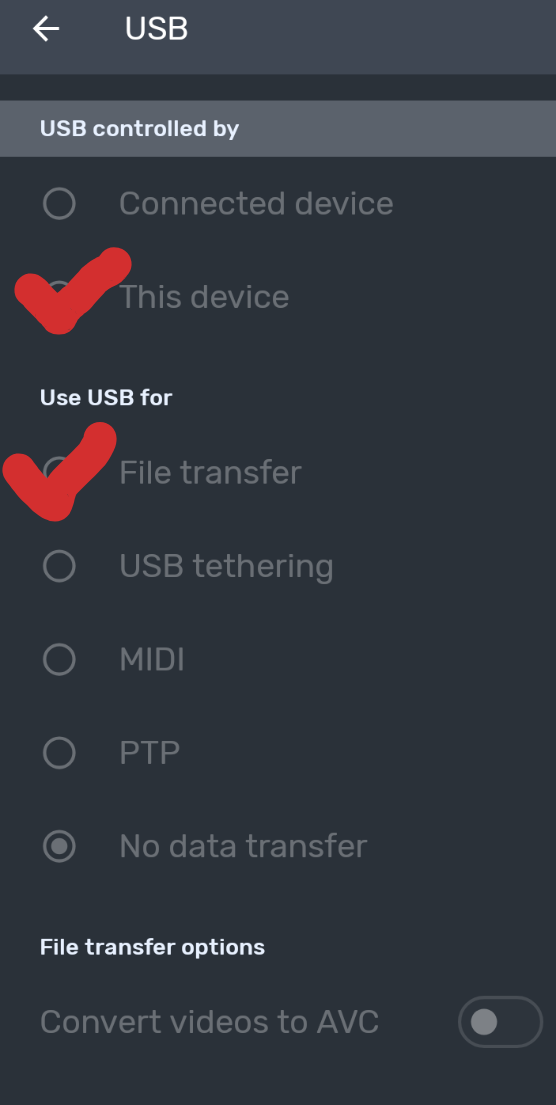
USB Controlled By is set to This Device AND Connected device (couldn’t switch to the latter while the accessories were plugged in. Attempting to mess with the option “Charge connected device” also couldn’t switch or do anything)
Trust > Restrict USB is set to Always allow USB connections and it seems like it was on that by default in the case of my unit for some reason
Tweaking these options did not change the issue. When I plug in the hub while it has a power cable connected, the phone behaves like it is just charging and ignore the USB devices. There is NO top notification anywhere for USB connection like a data connection to a computer. That screen can be accessed in the Settings menu by searching and the “Use USB for” section is blacked out when the hub is connected.
So if anyone else has ideas to try, I’m happy to give them a rip. Otherwise, is there an issue tracker for the operating system I can report OTG incompatibility on?
OK - bummer. Looks like you covered everything from that aspect. I’m not sure developer options will help at all in this case.
Just to be clear you did try this combo right (red ticks) - I know you said both controlled by were selected and you couldn’t change)? But could you do file transfer, or did you mean from your comment that wasn’t available (grayed out)?
One other thing I know from personal experience, and from working in IT in the past, is that those little USB hubs are often highly erratic in how they perform. Especially if they don’t have their own built in power - just because its worked okay with other devices doesn’t mean its 100% reliable…
So it might not be the phone - do you have any alternative hubs to try - especially a laptop one or similar with its own power supply?
So I thought I would jump in here. The Brax3 USB-C port is USB2 standards, from what the website stated. So that will be your limiting factor.
As for your dongles; I tried two apple dongles I have, which are not budget dongles. The USB-C to USB-A worked for me. But the USB-C to multiport (power, USB-A, HDMI) did not. It might be due to the USB2 Standard that the Brax3 is conforming to. I’ve tried to connect direct to a USB-C video cable, and that does not work either. However when I connect the same cable to my Fairphone 4 with e/os A14, the video is mirrored to the display.
Yes, good point @xancudo - that was going to me my next suggestion actually. In theory it doesn’t limit multiple devices, but I held off mentioning it initially as wasn’t sure if its contributing a bandwidth or functionality limitation without looking that up…
P.S. I was going to test a couple of USB Hub devices myself when I had time this weekend.
Correct, I had the phone configured with both options on the red ticks. Among the first two, you can edit them as long as you can get to that screen. The second set was set to be default to Filer transfer is developer options. I was able to find that obscure option by searching. It was greyed out while the hub was connected, but it showed File transfer as the one enabled while being greyed out.
Yeah, I know what you mean about those USB hubs being erratic. Even with a device that mostly works with them, I’ll have random USB devices stop being recognized and then I have to remove and replug them. Just something I’ve gotten used to. However, I have had these devices work with them outside of the random issues that call for replugging USB devices:
LG V20 – LineageOS
Pixel 6 Pro – LineageOS
Oneplus 9 Pro – LineageOS
Samsung Galaxy Tab S5e – LineageOS
All degoogled by me. The LG V20 is actually the exception that makes me believe this is a problem with drivers or something in the OS, and it could be fixed if this matter can be brought to the attention of the people working on the iodeOS version for this device. The V20 was happy to work with my hub setup on my desk from Android 11 to 12. In the transition to Android 13, this functionality broke, and it behaved more or less exactly the same as the Brax3. When power is plugged in to the hub, no USB device is recognized and the setup behaves like a plain charging cable. When there is no power cable plugged in, all USB devices are recognized, and obviously power is being drained from the device. Things get more complicated and inconsistent as I mentioned earlier in this thread when you start plugging and unplugging power and the USB devices while it is all still plugged in to the phone.
The other device that behaved this way for me was actually a Steam Deck. For that as well, with no power cable the hub acted like a USB splitter and worked fine. When a power cable was plugged in, no USB devices recognized, and I didn’t really note if it charged or not because the 5V is probably too little to make a dent in the Deck’s battery if it did charge. I just used this to try to get a keyboard to the Deck to install Bazzite.
Here are the other 2 hubs I tried from Amazon as well as the 3rd one linked above.
These are receiving power from the charge port on a Cyberpower UPS. I thought about trying a power brick plugged directly into a wall, but after what I am about to talk about next it didn’t seem worth bothering to set up.
As it just so happens you’re right that I do have a 4th dock for a laptop. I just tried it with the OEM Valve Steam Deck dock, and that works even worse. No charging, no recognition of the flash drive plugged in to the USB port or the ethernet port on the dock. Like nothing was plugged in at all.
I see your comment now Xancudo. That sucks, but you’re right that that is probably the issue. Maybe someone else can comment, but that will make it a tough decision to keep this phone or not if the USB-C port simply does not support charging while branching out to other USB devices.