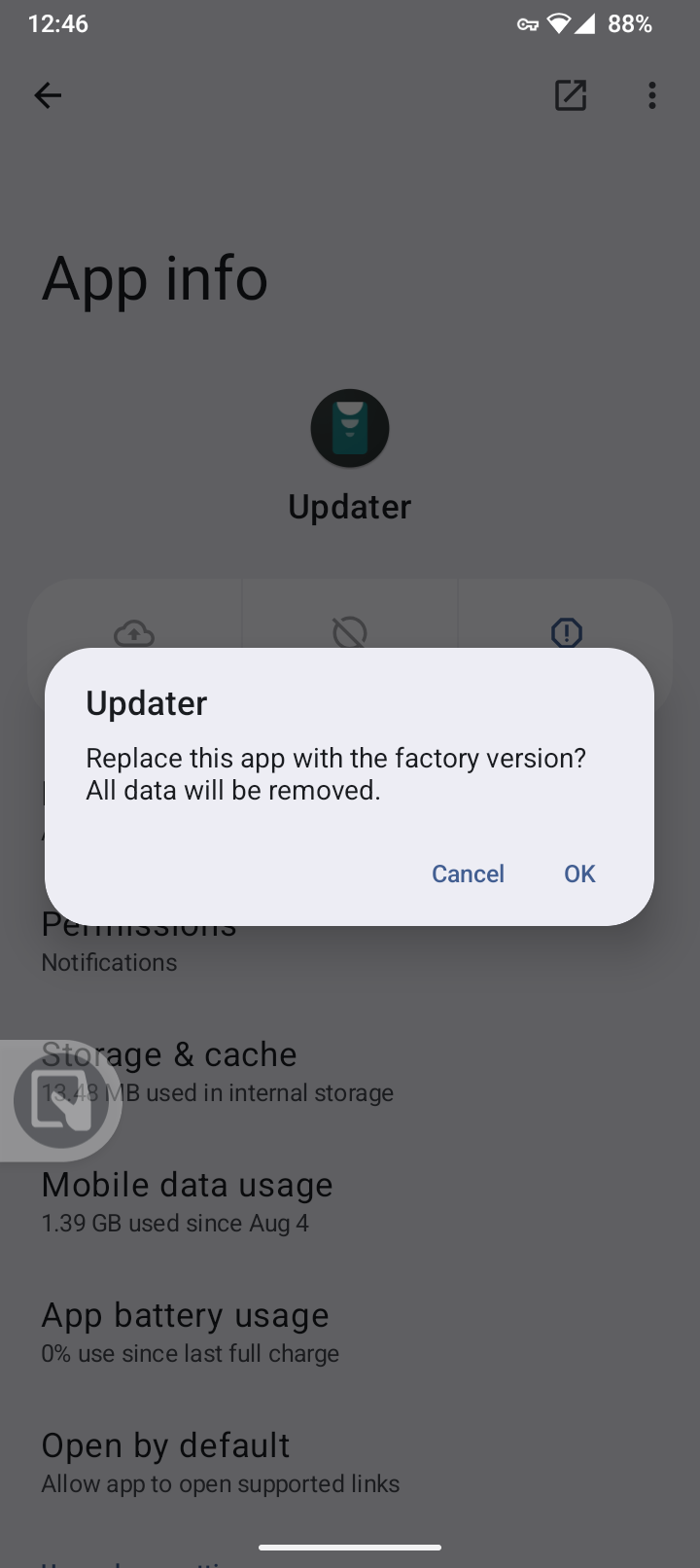
One more question. If i replace the beta updater app to the factory one I get this message. Will all the data from the phone be removed or just the beta update? Thanks and I won’t waste your time anymore.
I’m keeping my beta updater for the next update that comes along that COULD fix the wifi problem.
“All data will be removed”
I believe that’s referring to the data in the beta updater app.
I don’t know enough to risk YOUR data. Seedvault backup?
Backups are one of the hidden superpowers of electronic devices.
When starting to learn Linux, I installed and reinstalled 100 times and it was easy due to very few changes made to the OS at that point. When I started making changes I wanted to keep, I learned external HDD backup.
1 Like
Others will have this question too, so it isn’t a waste of time. Yes it takes time, but no it isn’t wasted. Pay it forward if you see others with this question you can now be the expert 
As @MikeL5280 notes, it is only referring to the “Updater app data” that will be removed. Your personal data is safe (the updater app itself doesn’t even have access to your personal data).
WARNING: Installing the latest OTA from Aug 11 led to problems with Brax3 making and receiving calls! I just deleted the update and restarted my phone and now calls are possible again.
Edit: apparently the installed update wasn’t the problem because it’s still installed, I guess restarting the phone helped. Still not sure what caused the problem…
I received my Brax3 and it does not work with ma WiFi router at all. Only with my old netgear mobile router it can connect and it works.
Will have to watch that. I wonder if it disabled your APN. Not worth you retrying however.
BUT, I suspect you are still on the update, deleting it from the “Updater” is just deleting the download. You can confirm your version from System > About phone
Please give router brand and model details here for both your older working and newer non working routers.
In addition, if you are willing, then try the beta from today:
1 Like
yes it does say Aug 11 update in the ‘about phone’ section
1 Like
Just putting my comment here to follow this thread, as I am having the same issue.
You can also “bookmark” posts, but yes if you have wifi connection issues do follow this thread! Your router / access point brand and model? What iodéOS version?
wifi is working my router is ZTE Lte Ufi Model: mf971rs2
wpa2(aes)-psk
ipv4v6
1 Like
The router is a Sagemcom f@st 5366s. Unfortunately, my provider didn’t provide any login details so I’ll be pinging them soon.
Noted. Can you confirm if you applied the 2025-08-11 beta update or not? I haven’t seen many reports yet of people trying it to confirm success or failure after applying it (there are a few here reporting it didn’t help though, so don’t be too excited yet)
I haven’t, in saying I did have a look and the phone said there wasn’t one. I’m on Aug 3rd update
I’m downloading from the link above, I’ll let you know soon.
Unfortunately the Aug 11th patch didn’t work.
I just tried connecting to my old phone’s hotspot (a personally de-googled moto g7) and couldn’t. Is it possible the wifi problem sometimes happens with hotspots too?
@Greenie
If you do go the WEP route, I would advise using the hide SSID option as well; since WEP is trivial to break. In fact, making your guest network WEP with a hidden SSID is best. Layer that security!
2 Likes
I’ve never seen a mobile/hotspot fail to auth with this bug. So, this’d be a first to my ears.