I too have had success with Brax3 hotspots connecting to other Brax3 devices; both with the 8/03 update and with the version prior to hte 8/03 update.
1 Like
Pixel 4a hotspot (running eos) also does not work.
1 Like
Doesn’t seem to be any rhyme or reason. Except these two hot spots are older devices. That’s the only commonality I can see. I think all of the routers that were working normally were newer models if I’m not mistaken. Though there were some newer models that were also failing.
I have 7 various routers that i have tested and only 1 connects, fortunately thats my main device. The 6 that fail (or to be more exact fail with any security option) are a mix of ISP models and two from Netgear. The one that works is D-Link DWR-978/E
1 Like
Netgear N600 iode version 6.6.20250803 tried multiple wpa/wpa2 combos on both bands. Any recommendations on a cheap(ish) router that is confirmed to work well? Currently using pixel6 as hotspot. My data plan is limited because I typically use home WiFi to download data to consume while I am away from home.
1 Like
I tried the beta 6.6 update and wifi still not working (Asus RT-AC68U w/ JRS Eco firmware 587.1_4).
2 Likes
Well that is why I am trying to get people to post successful router hardware also, but not a lot have (but believe me successful users are the big majority).
I use a TP-Link EAP245 as an access point at home (it is “just wifi” but then I have it in a more central location than my router which is in my basement), it works great and gives a very strong signal and excellent throughput speeds, and is $70 at Amazon. But there are so many ways to go out there. Unifi / ActiFi (home series) all report well, anything that supports OpenWRT seems to be good (gl.iNET is a great quality “open source first” company), etc.
2 Likes
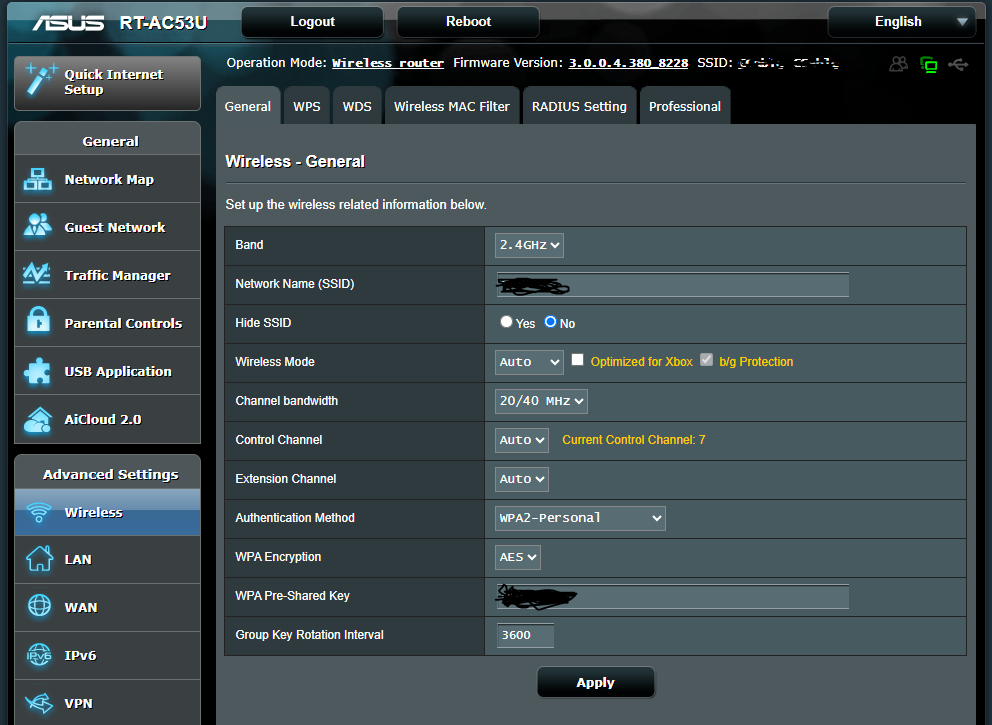
WiFi Router that doesn’t work Asus RT-AC86U
1 Like
We are getting the same “Cannot connect to wifi” as others on our new Brax3 phones.
Here is the router info. Thanks in advance for any help.
1 Like
Just rec’d the (link below) wifi extender and can confirm that I can connect my Brax3 to network/internet with this. I have it set in AP mode with WPAPSKWPA2PSK/AES security.
2 Likes
I found a similar version here in Canada (slightly different brand name) so I ordered it because it was fairly inexpensive. If it doesn’t work I’ll send it back.
I have the same issue. Can’t connect to home wifi or an open wifi. I have a data plan that allows me to use my cellular data as a hotspot as a backup for when my internet provider fails which happens peiodically. My computer sees the phone and the phone displays a wifi icon in the upper right corner but it never connects. I am using the T-mobile SIM from my old phone which could hotspot. Can’t connect to my home wifi. Brax finds my network but when I enter the password it immediately pops a fail message. I can call and text and that’s all. Called my carrier (Patriot Mobile) and was told to call the phone manufacturer.
Please provide your router make and model, and what iodéOS version you are on. We track all the working / non working routers here:
I’m using a Netgear AC1750 wifi router, and iodeOS ver 6.3-20250526-brax3
So you have not updated to the latest iode. What kind of PC are you using? Windows, Mac or linux?
You can go out to gitlab and manually download the update, then tether your phone to your device, copy it over, and use Updater to perform a local install of that update.
Is that correct, @rik ?
I have not installed or updated anything since I can’t get to internet, nor can I tether the phone to my Linux computer.
Yes, that one is on our list as "not working, reported by @TheBeeg , not sure if they have any update, but I suspect the 6.6 2025-08-11 beta update did not address it, as there are not many (any?) successful with that one compared to the earlier 6.6 2025-08-03 stable update. Well it did solve my WPA1 connection issue, but that doesn’t really count 
You should be able to use your Linux machine as a hotspot, what distro and desktop environment are you using? Well I should note it is a bit more complicated to “duplex” meaning you use the same wifi connection for your network access and for sharing with others. More standard is to use a wired connection for your network and then use your wifi card for hotspot sharing with others… which may not be physically convenient or possible for you.
Alternatives to get the brax3 on the network include a hotspot to another phone, using a usb-c to ethernet wired adapter, or on your router set up a guest network as a hidden but unsecured (or only secured using a captive portal). Or see if your router supports WPA3, that may work.
Well then of course an additional option is to get an access point “that works” added into your network.
None of these are ideal, but they may get you through until we come through with a proper fix.
When you connect your brax to your linux box do you hear any sounds from either, and do you see anything in your tray on the brax, possible with a message about usb connection or charging?
When i connect mine i get a notification, which i have to drop down and choose file transfer?
Most everyone ive talked with, with this issue, its usually that or a usb cable issue.
Are you saying that the 8-3 update will work if I can download it?
@rik i was asking that user if any audible or visual confirmation was received when they connected the device to the pc. Thats all.