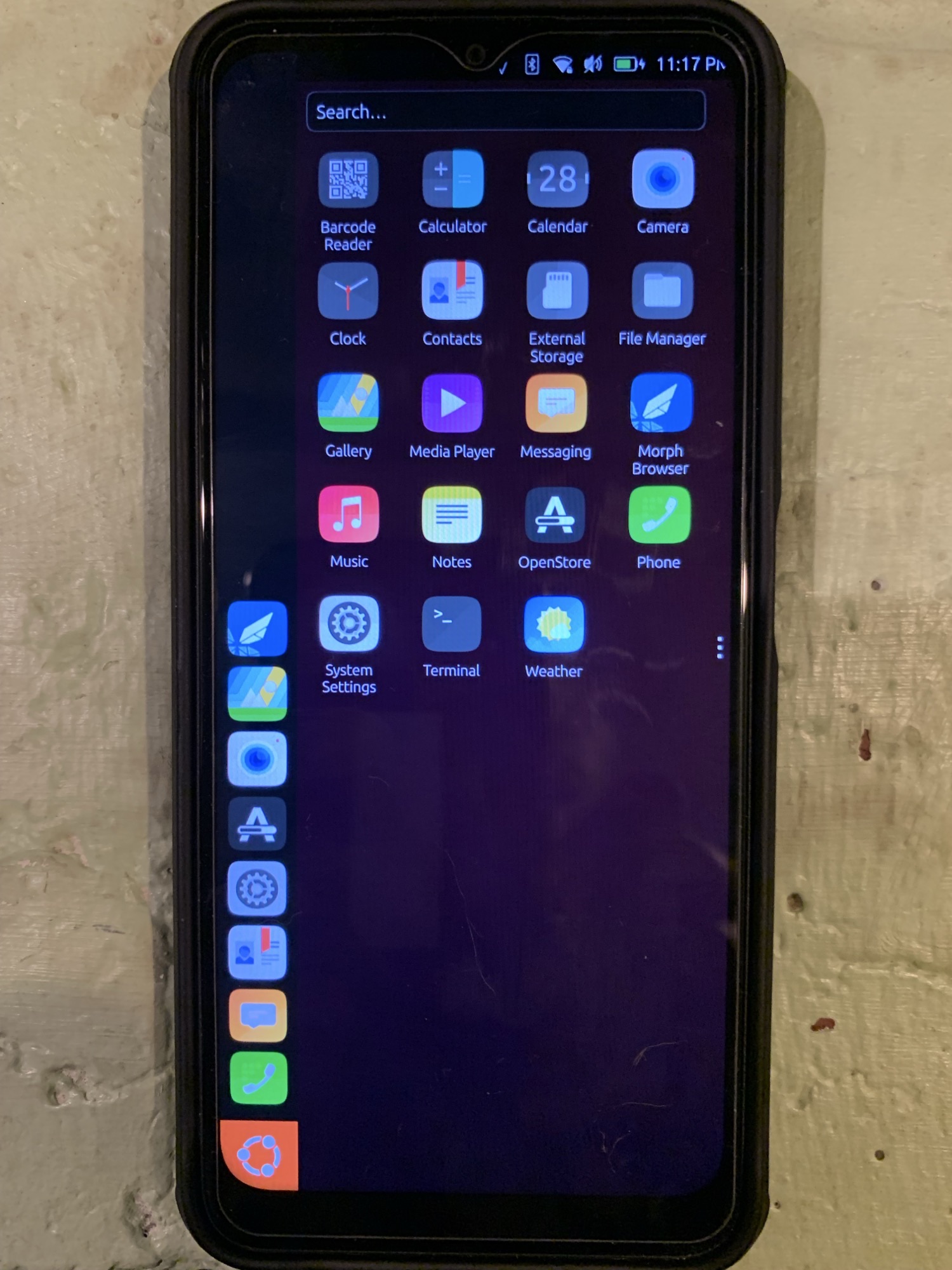
Hi all,
A very early version of UB Touch is now available on the BraX3.
Instructions on how to install it here: Releases - Open Source Community Guide
Hi all,
A very early version of UB Touch is now available on the BraX3.
Instructions on how to install it here: Releases - Open Source Community Guide
Thanks a lot for all of this!!!
Happy new year !
With Ubuntu Touch !!!
It was an ordeal, but I got it running by mostly following the instructions.
In case anyone else wants to try, here are my notes.
Some specifics:
xhost si:localuser:root” for spflash to runsudo sh SPFlashToolV6.sh " for the spflash command; that sudo is why I needed the xhost command abovedata_mux receive timeout or canceled " error. Things worked MUCH better on the next attempt using the USB-C port.xhost -si:localuser:root”It was such a pleasure to be back on the OS most comfortable to me. Kudos to all who have worked on it. Unfortunately - as you tell by the lack of a mobile connection indicator in the screenshot - it’s not connecting to my mobile phone carrier. On my ancient nexus4, under settings there’s a “Mobile” icon in the Network section, but it’s not present on my brax3.
I could live without a camera - the camera & barcode scanner apps die after a few seconds - but I can’t live without telephony & SMS from a phone not connected to wifi. Those are my bare needs from a communication device.
Because of that , I’ll probably switch back to iodeos until I can secure a 2nd brax3 for testing (with my backup SIM). However, I’ll leave things be for a couple days; if anyone wants me to check something - or if anyone has ideas on getting the mobile connection running - post here.
Not sure if I understood you correctly.
LunarOS is best installed via spflash. Link to the build is here: LunarOS on BraX3 - Open Source Community Guide
Thanks. I will have this corrected.
There are a few things that need to get fixed before UB touch is viable as a daily driver, as much as it is on other devices on which ub touch is more mature in terms of development. We’re actively working with the UB Touch team to get those bugs identified and put together a plan to get those resolved. I am working on sharing an issue board so everyone can track progress on this.
Thanks, @plamen . If I can get my hands on a second brax3 I’ll be back on UT soon after, but in either case I’ll be watching the issue board for VoIP telephony & SMS becoming functional.
For the lunaros install I had hoped to use fastboot instead of spflash due to LunarOS MEGATHREAD saying “Want to install LunarOS on your BraX3? Follow this guide“ which pointed to How to Manually Install or Update the OS on Your Brax Device , which says “There are 2 ways to manually install and update your OS on the BraX3: Via fastboot [and] Via spflash tool“. I didn’t see a preference for spflash. Anyway, no biggie, I got it done.  Thanks for all your work on this.
When I get to the end of the install for ubuntu touch, it says
error can’t generate image for userdata.
Did you have that issue ?
I don’t see that message.
At which step do you see it?
I assume it’s when running:
fastboot -w
fastboot format:ext4 userdata
Are you running those commands in bootloader mode (avoid fastbootD mode)?
Yes that is where I get that error, I tried skipping the fastboot -w, since that has worked on other devices before. But it did not work. I tried flashing all images through bootloader but
When flashing ubuntu.img it tries to flash 23 sections (opposed to 12 in fastboot) but errors out at #2
I flashed everything else through bootloader.
It seems you’re installing UT the same way I did.
Maybe we have used a different version of fastboot ?
I downloaded a fresh version of the latest platform tools for Linux. What version did you use ?
Did you use Windows or Linux ?
From my shell history:
$ sudo fastboot -w
Erasing 'userdata'                                 OKAY [  0.034s]

    F2FS-tools: mkfs.f2fs Ver: 1.16.0 (2023-04-11)

Info: Debug level = 1
Info: Trim is disabled
Info: Set conf for android
Info: Enable Project quota
Info: not exist /proc/version!
Info: Segments per section = 1
Info: Sections per zone = 1
Info: sector size = 512
Info: total sectors = 466304960 (227687 MB)
Info: zone aligned segment0 blkaddr: 512
Info: add quota type = 0 => 4
Info: add quota type = 1 => 5
Info: add quota type = 2 => 6
Info: format version with
  "6.17.9-76061709-generic"
[f2fs_init_sit_area: 641] 	Filling sit area at offset 0x00600000
[f2fs_init_nat_area: 675] 	Filling nat area at offset 0x01a00000
[f2fs_add_default_dentry_root:1259] 	Writing default dentry root, at offset 0x2ba00
[f2fs_write_root_inode:1304] 	Writing root inode (hot node), offset 0x2b400
[f2fs_write_default_quota:1390] 	Writing quota data, at offset 0002ba01 (1/2)
[f2fs_write_default_quota:1390] 	Writing quota data, at offset 0002ba02 (2/2)
[f2fs_write_qf_inode:1442] 	Writing quota inode (hot node), offset 0x2b401
[f2fs_write_default_quota:1390] 	Writing quota data, at offset 0002ba03 (1/2)
[f2fs_write_default_quota:1390] 	Writing quota data, at offset 0002ba04 (2/2)
[f2fs_write_qf_inode:1442] 	Writing quota inode (hot node), offset 0x2b402
[f2fs_write_default_quota:1390] 	Writing quota data, at offset 0002ba05 (1/2)
[f2fs_write_default_quota:1390] 	Writing quota data, at offset 0002ba06 (2/2)
[f2fs_write_qf_inode:1442] 	Writing quota inode (hot node), offset 0x2b403
[f2fs_update_nat_default:1478] 	Writing nat root, at offset 0x00001a00
Info: Overprovision ratio = 0.300%
Info: Overprovision segments = 346 (GC reserved = 340)
[f2fs_write_check_point_pack: 857] 	Writing main segments, cp at offset 0x00000200
[f2fs_write_check_point_pack: 945] 	Writing Segment summary for HOT/WARM/COLD_DATA, at offset 0x00000201
[f2fs_write_check_point_pack: 959] 	Writing Segment summary for HOT_NODE, at offset 0x00000202
[f2fs_write_check_point_pack: 971] 	Writing Segment summary for WARM_NODE, at offset 0x00000203
[f2fs_write_check_point_pack: 982] 	Writing Segment summary for COLD_NODE, at offset 0x00000204
[f2fs_write_check_point_pack: 991] 	Writing cp page2, at offset 0x00000205
[f2fs_write_check_point_pack:1010] 	Writing NAT bits pages, at offset 0x000003fe
[f2fs_write_check_point_pack:1031] 	Writing cp page 1 of checkpoint pack 2, at offset 0x00000400
[f2fs_write_check_point_pack:1050] 	Writing cp page 2 of checkpoint pack 2, at offset 0x00000405
[f2fs_write_super_block:1084] 	Writing super block, at offset 0x00000000
Info: format successful
Warning: skip copying userdata image avb footer due to sparse image.
Sending 'userdata' (97 KB)                         OKAY [  0.003s]
Writing 'userdata'                                 OKAY [  2.932s]
Finished. Total time: 3.270s
$ sudo fastboot format:ext4 userdata
Warning: userdata type is f2fs, but ext4 was requested for formatting.
mke2fs 1.46.6 (1-Feb-2023)
Creating filesystem with 58288120 4k blocks and 14573568 inodes
Filesystem UUID: 3b24c8b6-046c-4f9f-aacc-3c18ad88641a
Superblock backups stored on blocks:
	32768, 98304, 163840, 229376, 294912, 819200, 884736, 1605632, 2654208,
	4096000, 7962624, 11239424, 20480000, 23887872

Allocating group tables: done
Writing inode tables: done
Creating journal (262144 blocks): done
Writing superblocks and filesystem accounting information: done

Warning: skip copying userdata image avb footer due to sparse image.
Sending 'userdata' (6363 KB)                       OKAY [  0.177s]
Writing 'userdata'                                 OKAY [  0.159s]
Finished. Total time: 0.649s
$
$
Software I’m using:
$ adb --version
Android Debug Bridge version 1.0.41
Version 35.0.2-android-tools
Installed as /nix/store/q17av8m8k96y1yqqssbbpi9r8fnbyhp2-android-tools-35.0.2/bin/adb
Running on Linux 6.17.9-76061709-generic (x86_64)
$ fastboot --version
fastboot version 35.0.2-android-tools
Installed as /nix/store/q17av8m8k96y1yqqssbbpi9r8fnbyhp2-android-tools-35.0.2/bin/fastboot
$
weird. it should work.
arch linux.
and i use fastboot provided by arch linux
$ adb --version
Android Debug Bridge version 1.0.41
Version 35.0.2-android-tools
Installed as /usr/bin/adb
Running on Linux 6.18.2-arch2-1 (x86_64)
$ fastboot --version
fastboot version 35.0.2-android-tools
Installed as /usr/bin/fastboot
I will update the documentation. Thanks for sharing!
I have this running on my 2nd BraX3 but like u can’t get a mobile connection with a SIM card. Did u see anywhere to enter an eSIM?
VoLTE service is still in development and not yet available.
Should it connect to voice and 5G with a regular SIM card from Mint Mobile?