iodéOS Updater App / iodéOS Version 7.3

Device: Brax3 (1st Commercial shipment)

OS Version: iodéOS Version 7.3-20260304-brax3

Android Version: 16

Mobile Carrier: None Yet

Updater App Version: 16 org.lineageos.updater

Problem: Updater

The iodéOS Updater app has been unable to connect to a server in order to check to see if there are any updates since I successfully installed iodéOS version 7.1 . I tried clearing the Apps Storage and Cache without success.

I was able to do Local Updates after downloading both Versions 7.2 and 7.3 .

The updater app currently indicates:

Android 16

March 4, 2026

Last checked December 31, 1969 (7:00PM)

No new updates found. To manually check for new updates, use the refresh button.

I would anticipate that a successful connection to the Update Server would support an update to the older Last Checked 12/31/1969 date… and that does not happen, even in the event “no new updates found”

Iodé Browser currently is functioning with my Local WiFi connection with plenty of speed.

I downloaded the manual iodéOS Versions 7.2 and 7.3 directly to the Brax3 using it.

I have been patiently awaiting to decommission my Brax2 to transition to my Brax3 with T-Mobile as my current Cell Carrier. I wanted to wait until the platform was more stable, and it appears to be getting to that point, but the IodéOS Updater doesn’t appear to be functioning as it should. I can see that I can remove the Updater App in settings (After forcing a Stop) as a possible way to Re-Load the App to see if that process would fix things, but since the Updater App is what imports manual Updates, I was unsure how I would be able to Re-Install the iodéOS Updater app, if that app can only be installed with an entire system OS Update.

It also occurred to me that it might be possible that the iodé App, the one that blocks internet connections to sites, might be preventing the iodéOS Updater app from connecting…. Completely or possibly partially in the event an outgoing connection succeeds, the subsequent redirect connection (to a 3rd party CDN or Github) might not. I don’t know enough about what sites/addresses should be whitelisted/Allowed to test this possibility.

The Iodé News App does function properly and I do get notifications regarding new updates to the OS.
There is a problem with the updater a long time now.

1 Like

Thanks George for the fastest reply ever!!! ok so a known issue with updater… of which I will assume they are working on? Since there have been issues with some phones which result in the recommendation that a Factory Reset should be done, I hesitate to move everything over to it and get a new SIM from T-Mobile since my Brax2 is still going… although the Flashlight LED no longer works, and I have been experiencing some Dimming of the Screen intermittently… It still makes/receives calls and Texts and supports Wifi Calling and Wifi Hotspot… so I hesitate to jump…

Yes, same issue there. My updater said that it was unable to connect to the internet and the last check was made on March 20 / 2026. I did clear the app cache and data, and now it still say that it gets no Internet connection and that the last check was done the…. 01/01/1970 (01:00)

2 Likes

Hi Stanwood, Out of curiosity, are you at the latest iodéOS 7.3 Version?

Does your phone connect to your local Wifi and the iodé Browser work?

Hi Nibbana,

Yes indeed, WiFi and Cellular Data work perfectly fine. Browser works fine as well. I’m on IodéOS 7.3.

Thank you. Cheers, Stanwood

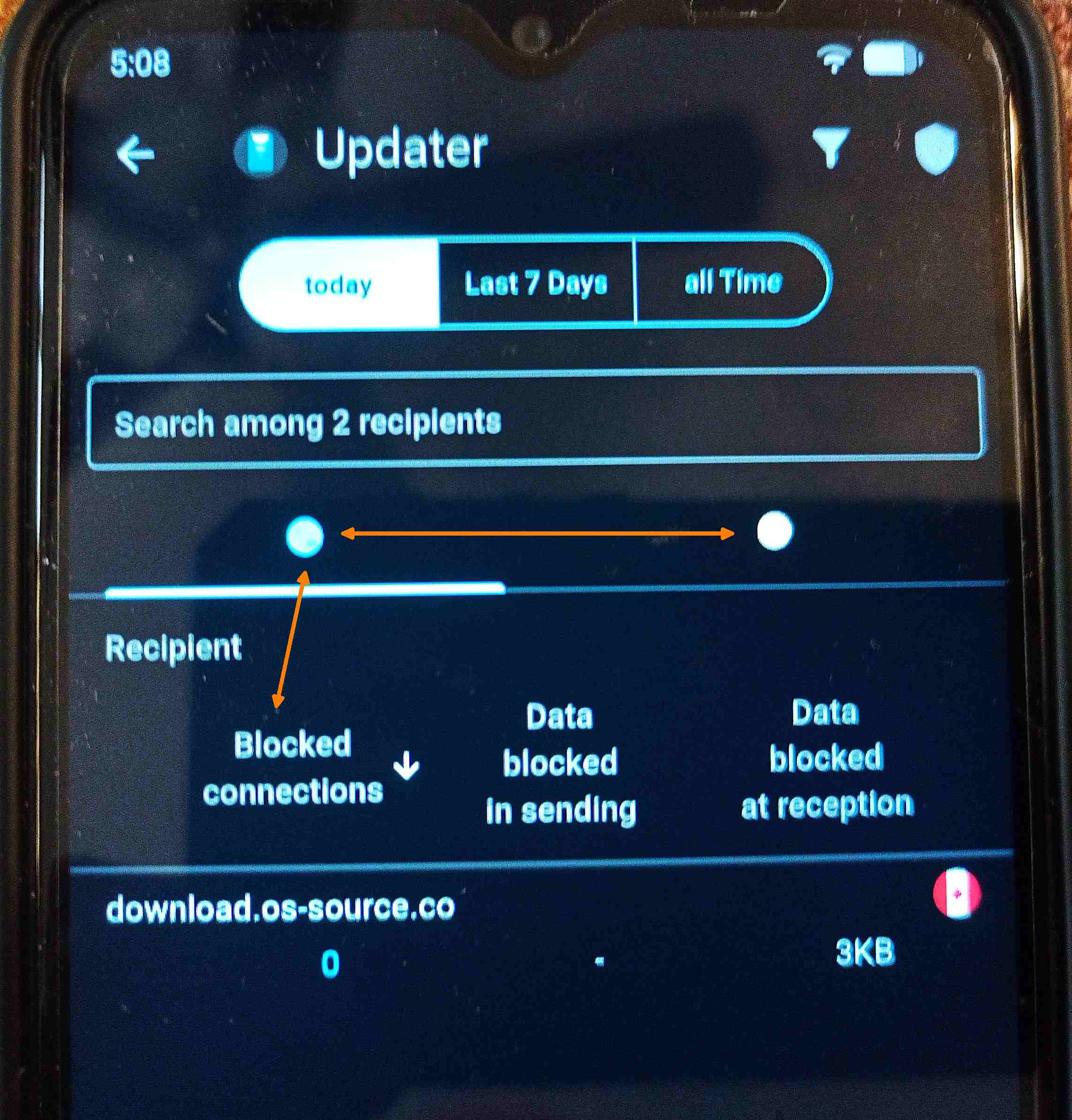
It appears as though the iodé App (the one that blocks internet connections to sites) may be blocking at least 1 connection to download.os-source.co which is a location on a LUNR network that hosts the Brax3 IodéOS software download…among others. Its strange because the counter in the App under “Blocked Connections” indicates “0” which would make you think that there have been “0” blocked connections, but the actual entry (in that “Blocked Connections”) Column would itself lead you to believe that its more likely that the counter started at 0 for its first block…or is some type of ‘holder’ digit. There was 1 Blocked connection entry when I checked the phone this morning, Indicating “0”, and there was an “Authorized” entry for the same destination as well… however after opening the “Updater App” and checking for an update, the “Reception/Receiving” data counter in the “Blocked” connections, Increases, where as on the “Authorized” tab there is no indication of any Data amounts, although the entry to that destination exists and the physical connection counter increases only under the “Authorized” tab… the Blocked tab only ever shows “0” but shows the physical received amount of ‘blocked’ data increasing. I think this is the source of the problems with the Updater App not working…. (my guess is) somethings up with the iodé App blocking the responses from the target server being used by the Updater App.

The update server URL is congured here, app/src/main/res/values/strings.xml · v7.3 · os / public / lineage / packages_apps_Updater · GitLab

and it should point to this file, https://ota.iode.tech/v7/brax3.json

which links to this file, https://gitlab.iode.tech/ota/release/-/raw/master/brax3/iode-7.2-20260131-brax3-ota.zip

so it’s unrelated to, http://download.os-source.co/

I assume the updater has been compiled with this source.

I will have a look under what circumstances the "snack_download_failed" is called.

It is called at line 510 of this file, app/src/main/java/org/lineageos/updater/UpdatesActivity.java · v5-staging · os / public / lineage / packages_apps_Updater · GitLab

(On my Brax3 v.7.3) If you go into the Iodé App (v3.1.5) “Home Page”, Then select the “Report” icon at the bottom, you will see a report of connections/blockings by source apps. One of the apps in that list is called “Updater”. When selecting the Updater App displayed within the resulting report, it shows download.os-source.co under the “Blocked connections” with the “0” Counter screen…. So at least on my phone (and maybe others which are experiencing a similar problem) it is pretty clear that the “Updater App” (v.16) is, or has been at a previous point, associated with/to download.os-source.co . I manually upgraded to 7.2 and 7.3, but I cannot remember what I did for the pre 7 release to 7 release upgrade…it may have been that the download.os-source.co was used at some point which has since been changed, however maybe in the update process, some kind of previous cache/user data is overriding a newer target you are seeing in current code… I am guessing purely, as all I can tell you is that MY updater (v.16) seems targeted to download.os-source.co .

Mine shows 8 authorized connections to this address but I have the same problem.

8 Authorizations, under the Authorizations tab… but no data qty…. under the Blockings tab, it will show “0” under counter, and will show incrementing data qty. as you attempt to update…. as if the Update Responses, Incoming, Receiving, is being blocked.

I can see data sent and received, some tens of KBs

I would/could possibly modify the blocking using the Iodé App to allow it, but I was holding off because this would be what I would think could be a critical misstep that could open the phone to a malicious update possibly… so I will wait until you, or someone else discover what is really going on, and the correct process to remedy it.

In/under the “Blocked connections” tab or the “Authorized connections” tab?

Under authorized, I can’t see any blocked connections.

I disabled the blocker completely but I get the same error.

On my Brax3 , under “Authorized connections tab” it currently shows “9” connections, but no data qty either in/under the “Data received” or “Data sent” columns…. instead, the data qty increments under the “Blocked connections tab” with a persistent “0” connections counter…. but my phone doesn’t work as far as updates… does yours?

No, it hasn’t been working since February 26th.

You would only see blocked connections, under the iodé Apps Blocked Connection bullet (two dots below the search box) which you can toggle.

As far as disabling the iodé App, I am not sure that the real problem manifests in the iodé App.

The Updater App that targets the download.os-source.co may be the true problem.

For other apps I can see blocked connections but not for the updater. The only solution is to compile the updater from the source in case the one shipped with iodé is searching at the wrong address for some reason.

Anyway manual update works, I’m on 7.4 beta now.