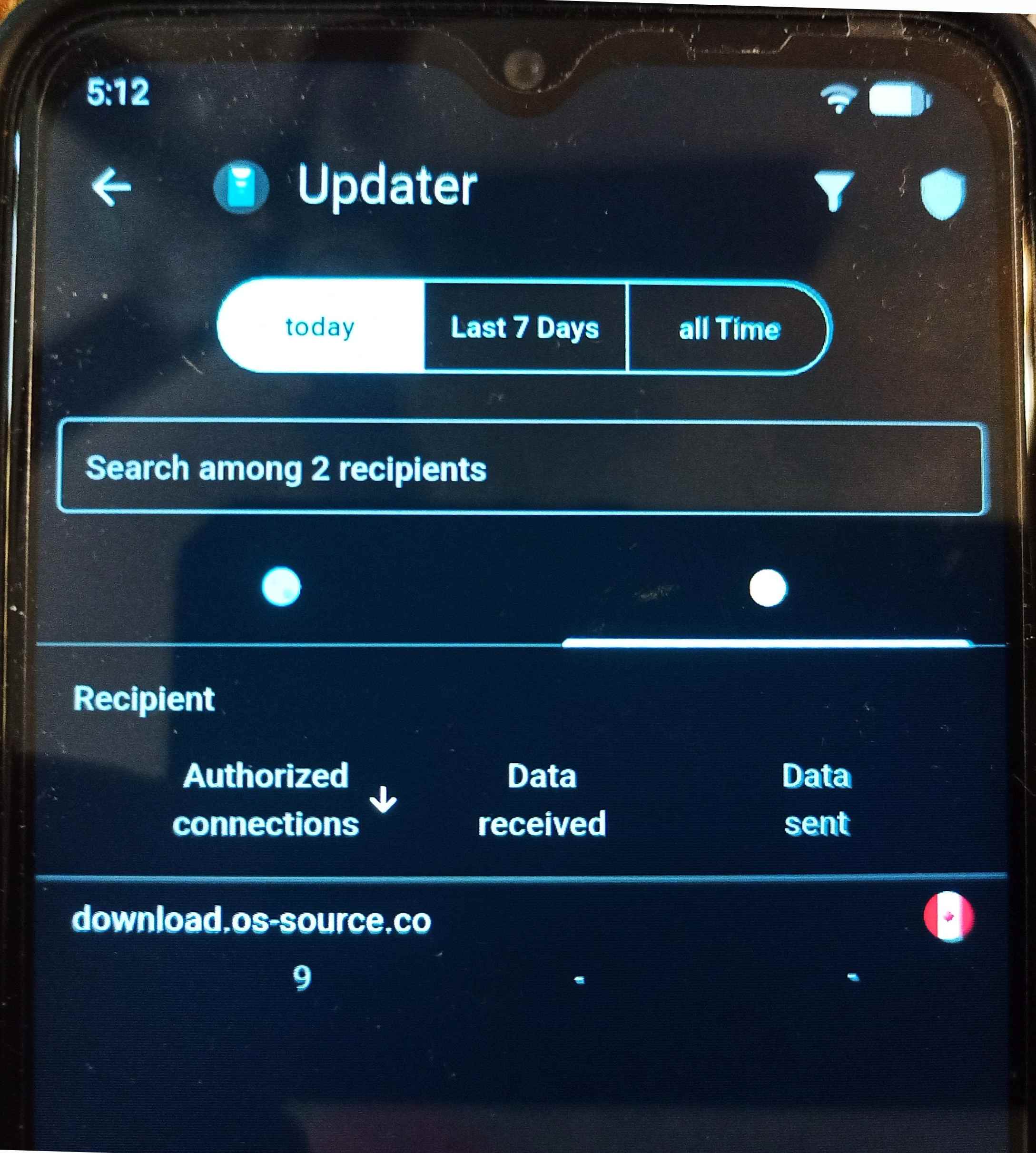
I would hope that there would be a simpler fix process to remove and then re-load a good Updater App… but I don’t know where/how that could be done…. and thats “If” its the real problem… since your Brax3 appears not to be blocking, but still not working, its all just guessing… but perhaps whatever update mechanisms are at play, Blocked or Not blocked Updates may be subject to additional ‘Source’ checks and/or file checks which fail when the source is download.os-source.co or the resulting files from that source are not qualified.
I don’t have the second dot , no blocked connections.
You can see in the source code that it checks the version and compares it to the available one to see whether there is an update.
It is not directly clear in the source code what causes the error , it appears as a possibility when it calls,
UpdateInfo update = mUpdaterService.getUpdaterController().getUpdate(downloadId);
I have to look into the source code of the UpdaterController
Ok, is that possibly because you disabled blocking?
No, it was like that before, when you turn off the blocker from the central switch it stops monitoring everything and it’s disabled.
What is your version of Iodé App ? mine is (v3.1.5)
In my case I confirm that I could update the system (just a few days ago) from IodéOS 7.2 to IodéOS 7.3 using the same updater and without any issue. So I assume that the problem came along with 7.3 (?) Anyway, I was also hesitating to uninstall the updater, but I didn’t dare to do this since I have no idea how to find it back and reinstalling again… (I don’t think I can find it in F-Droid repos…?)
So by now, I’m just waiting for the team to find a fix. Next 7.4 stable won’t be released anytime soon. So no immediate worry 
EDIT: Updater version 16 (org.lineageos.updater)
Iodé app version 3.1.5 (com.iodé.app)
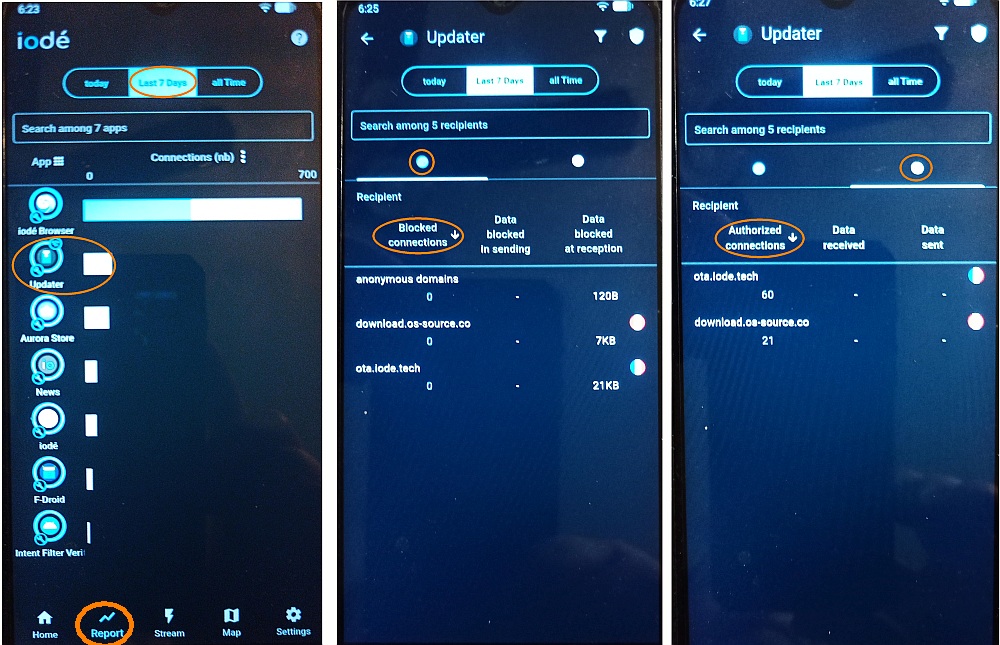
Stanwood… If you go into the Iodé App (v3.1.5) “Home Page”, Then select the “Report” icon at the bottom, you will see a report of connections/blockings by source apps. One of the apps in that list is called “Updater”…. what server do you show the updater (trying) connecting to?
Edit: you may have to select the last 7 Days, and then maybe you could see what it was connecting to prior to the 7.3 update?
So…. I have only one connection: download.os-source.co (If I’m on the right page)…
Oh EDIT again: If I go to “from the installation” (“Depuis l’installation” in my language), I have:
ota.iode.tech
gitlab.iode.tech
anonymous domains
Note that this is a replacement model that my daughter just received about 10 days ago (previous one got the screen damaged). As it was provided with Iodé 6.3, I could not install newer than 6.9 with the updater. So I managed to install 7.2 (zip file that I’ve found somewhere after a long search time) using the “Local Update” menu, and then I could update to 7.3 directly from the updater…
This is the “whole” long story…
Ok thank you. I just edited my previous message with all details (and story)… Thank you!
Yes, I can remember there was some special process you had to go through in order to get to the 7 Release series…. and I am wondering if these issues we are experiencing now are due to that original process….but then you said you were successful in going from 7.2 to 7.3 using the updater, so then that would make less sense…. Strange why Brax would send you a phone with the older software…you would think they wouldn’t send anything out with less than the current release….maybe they just did a factory reset before they sent it maybe forgetting to update it…
Thank you, indeed. So it seems it’s a brand new one, as I received it just the day the “old damaged one” came to the logistic center in Ontario / Canada (I’m living in Switzerland).
I guess the phone still got the “initial” software and has never been turned on… But this is not an issue as I managed to fix this.
Is your newly updated to 7.3 Phone showing that the Updater App has data Qty (Received/Sent) in the Authorized Tab or the Blocked connections Tab ?… see the two pics on the right of my previous post…. mine only shows Data Qty under the Blocked connections tab…120B /7KB/21KB under “Data blocked at reception” column
Sorry… I just turned-it off as it’s time to go to bed in my time zone… Will try to check this tomorrow… Thank you.
There are 4 cases that the PAUSED_ERROR is triggered, one of which is the missing file destination and all those are logged in the LogCat. I will connect the phone to the PC to get those messages though it’s not important since the local update works.
Indeed the Updater has been compiled to be looking for updates at http://download.os-source.co/ which may be the correct location since the updates will be moved to Brax servers.
An option to configure the repository manually would be helpful but it may poses a security risk.
you can see part of the LogCat here,
D UpdatesActivity: Checking https://download.os-source.co/brax3/iodeos/v7/ota/ota.json
E HttpURLConnectionClient: The server replied with code 404
E UpdatesActivity: Could not download updates list
I imagine that the compilation instructions here, os / public / lineage / packages_apps_Updater · GitLab , have to be combined with the repositories mentioned here, https://git.os-source.co/iodeOS/build
If you update the updated from v6 to v7 beta, then you can download the latest update and do a manual install. Worked for me.
George, I am glad that you have the know how to see where, in the Updater App code, the download.os-source.co is called out… I wouldn’t know why the download to the Brax3 phone may be failing via the Updater App, because as you have previously indicated, even with the Iodé App ‘Disabled’ the update still does not work… so it’s not necessarily a “Blocking” issue. With that in mind, there must be something either with the Updater ‘Request” that the Targeted server doesn’t understand, OR, the Targeted Server’s ‘Response’ not being acceptable to the Updater App….. I would have to assume there is built in protections within the Updater App to ‘Qualify or Authorize’ a resultant target server, and/or resulting update file that is delivered by that target server….before running it… The fact that the Updater App did/does not indicate an update is available (to a phone which is running an older release) would somewhat support either the request inquiry not being understood, or the Response(or lack of it) not being valid. We would have to know how the updater app was designed to work, and what (if any) error it gave… since we show ‘some’ data is being sent from the download.os-source.co server (via the data qty incrementing in the Iodé App) I would lean towards believing the data that IS being delivered is “Invalid” in support of allowing the Updater App to process… Why it may be invalid is a big unknown unless the Updater App has a Log that can be looked into.
I just answered your question in my previous message where I demonstrate the LogCat, the updater looks for updates at the os-source.co instead of Gitlab but this may be due to the fact that they will move the updates to Brax servers.
That is there is no .json file describing the updates at this location yet.
The server correctly responds with 404.
George, Understood… but if you go to that location download.os-source.co you can actually see the latest version(s) for the Brax3….. Correction….. as of me checking just now…. the ‘7’ series of updates/downloads are not longer present… they have removed them within the last 48 Hours….. Ok, so it (Updater App) is looking for a .json file that doesn’t exist on download.os-source.co … end of story… and you said that this is likely because the updates MAY be destined to be sourced from Brax servers as opposed to Iodé or gitlab… it will be interesting to see what it turns out to be… I would think that they would prefer to host from gitlab , for transparency…. so maybe its just that the Updater App didn’t get the correct update to the .json file location on Gitlab…