Where’s the ‘fun’ in playing it safe? 
It’s a learning experience and not typical that there would be bugs in updates. I’ve used iode’ OS since 2021 and this is the first update that has been problematic.
Where’s the ‘fun’ in playing it safe?
It’s a learning experience and not typical that there would be bugs in updates. I’ve used iode’ OS since 2021 and this is the first update that has been problematic.
My BraX3 has been running stable for almost 3 days. Today I started doing the first android debug with logcat and tee while listening to the same podcast that caused the phone to reboot four times before. I am not seeing any errors and have listened to this podcast over and over for 3 hours! 
This morning my phone froze for several seconds while using it, then I saw a bunch of text characters in a diagonal pattern all over the screen, then the phone rebooted. Just providing another observation.
As I noted above, I also am having random reboots/restarts. Thinking back on it, I now believe it is the 7.1 update since I didn’t have these daily restarts on 7.0. Hopefully the next update will resolve this issue.
I’m happy to let everybody know that my BraX3 that I reset in iode’ 7.1 has remained stable and not rebooted unexpectedly in almost 6 days. I’ve ran bug tests on it while doing the same things that made it reboot before and it has not behaved strange. Tomorrow I will restore my seed vault backup settings and see if it continues to be stable!
What debug exam or scripts are you running to check the bootloader or the phone in general, has there been any-others who have experienced this or the brax 3 techs that has run multiple phones that have found Iode 7.1 to be stable?
Do you remember the activityh on the phone prior to it freezing?
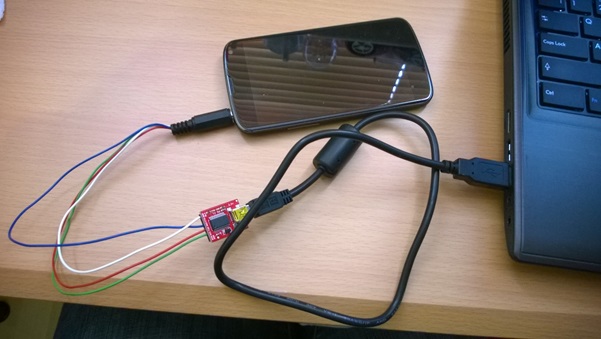
I am just looking at the logcat file using the tee command. It seems that the bootlogs are only accessible by a UART adapter. I have an adapter but don’t see an easy way to get to the needed holes or pins on the phone. If no soldering is involved, I would try this with a guide. I did this years ago on a router but my soldering gun has since broken. This guide seems like what I did:
I tried sharing a file via the nextcloud app.
Beyond that this is very old it deploys a double purpose audio jack like Pinephone’s one.
Is this the case with Brax3?
Will Android 16 let you do something like that easily?
That ADB tutorial that Plamen posted mentioned bootlogs could be obtained via UART. That post at PenTester is 12 years old so hopefully there is something easier than that now to get UART access. This is the ADB tutorial but the dmesg log does require root.
There isn’t anything easier, you need this audio jack configuration and capture the output through a terminal application like picocom or whatever, the same you said you did with the router. As I can understand the audio jack initially works as UART and then becomes audio except if it’s some other configuration and does both. Pinephone has a physical switch to select the function.
I have picocom on my Linux Mint computer. What do I do on the audio jack of the phone?
It’s what you see in the picture, the audio and mic pins work as transmit and receive lines with a common ground but you have to connect the right pins to the correct line, it should be the same for all devices
I was lazy to read the article, it says that if you provide the mic with voltage above 2.8 volts it turns to UART operation so you have 4 pins, receive, transmit, ground and voltage.
it’s easier than taking the phone apart and soldering pins! 
Yes, you don’t open the phone, you have to connect the right jack pin to the right board position, don’t throw the voltage to the other pins, it says to the microphone.
Is this still possible in 2026?
As I can see on the internet every manufacturer can do different things like having the UART on the board or in the USB and probably you have to activate it in Android.
ok-this would probably be a security risk that should not be in the BraX3. I’m surprised that any modern phone manufacturer may still have this!