Can anyone else do this after the update? I am still not able to do WiFi Calling. I would not have closed the issue till some of us in the field got the opportunity to test it. If others are getting it to work, again there cannot be any cell signal, just because you have it enabled, it has to be an area where there is no service, or just WiFi Calling only.
Does it work in aeoplane mode? I"ve been hanging for this update, living rural. I havent updated yet; its only just showed up in my updater app. Ill give it a go shortly
Edited to add:
No change. No wifi calling dispite 6.9 upgrade. Phone has sim card toggled off, and in aeroplane mode. Wifi obviously on. Phone set to use mobile if available and drop back to wifi if not. If aeroplane mode is turned off, phone app displays message saying connect to mobile service.
The only way to make a wifi call is to have cellular signal. Which obviously defeats the purpose
Did you reset mobile network connection per the indications?
“Brax 3 phone: Wi-Fi calling has been fixed. For this to work, it is necessary to reset the mobile network settings (Settings → System → Reset options → Reset Mobile Network Settings)”
Did that. No change. Dialler will engage, but pop up stating connect to cellular network persists. Aeroplane mode off, sim card toggled off. Wifi on.
Mine is not working either… I set mine to use wifi to call over the cell phone. Also did the reset… not sure where the original instructions to go check…
I don’t have a cell signal free space to test this…
have you tried it with sim card set to on and airplane mode off where there is no signal?
I haven’t. I have occasional weak signal, but other carriers have to be available for emergency calls, so theres usually something picked up, even if it doesnt work.
In any case, it shouldnt need the sim on i’d have thought, unless it needs to read the phone number.
This update IODE 6.9 and followed the instructions but no go. Also tried the airplane mode on and wifi on… Also no go. T-Mobile on previous phone wifi calling worked. I am also in a roaming location.
UPDATE: I am now thinking mine has to do with the carrier and the e911 settings for WIFI to work… this will take some time to work out.
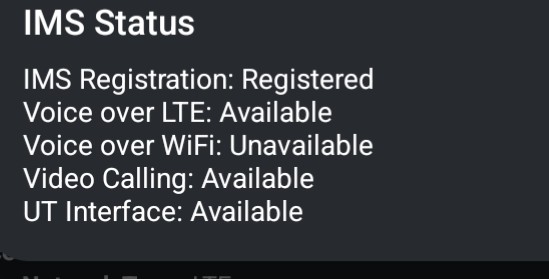
Doing this command I get the following
##4636##
A hotfix build has been released for several issues, including an improvement for Wi-Fi calling: iodéOS 6.9 Hotfix released
2 Likes
No fix. Updated, rebooted, reset network settings, made sure phone connected to cellular network.
Turn off sim card, aeroplane mode on, wifi connected - can’t make call. Pop requesting turn off aeroplane mode.
Turn off sim card, uncheck aeroplane mode, - pop up requesting connect to network
Turn off sim data on pull down menu, with aeroplane mode off, can call but is using cellular to do so, despite showing a wifi calling symbol.
So no change
After resetting network settings, did you enable WFC again in SIM settings ?
1 Like
Yes, that brings up a pop up telling me to ‘connect to a network or turn off aeroplane mode’ and dialler greys out
One remark : SIM must not be turned off for WFC to work. Cell signal can be cut, but SIM must be provisioned.
Does WFC work when you have cell signal ?
Could you retry in airplane mode but SIM not turned off ?
And in the settings page where APNs are listed, do you see an ‘IMS’ one ?
1 Like
With everything on as normal, and then aeroplane mode switched on, pop up dipslays ‘can’t connect to server’ and dialler closes.
If i go into my shed, where i lose all cellulr connection but have wifi, i get a pop up telling me to connect to a mobile network, even with aeroplane mode off
Wifi call can occur when i have cell signal, but my issue is at home it is poor, so my 5g modem is on the roof, and i want to connect to that more reliably. If i have cell signal on the phone, theres no point in wifi calling.
Ideally, i want to carry the 5g modem with me when i travel, and connect to it via vpn for calls etc, so the modem is tracked by phome company, but my phone usage isnt
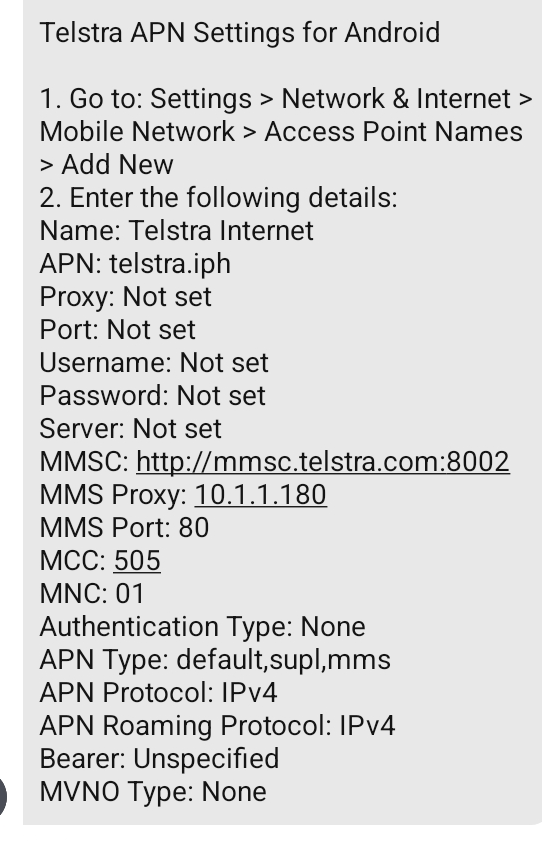
Apn settings have been reliable so far. No IMS one.
So maybe an issue for the telco ims APN settings. What’s your operator ?
1 Like
Boost (telstra in Aus).
I can check. It did work previously on a different phone. Unless something changed when i did an annual recharge which was about the time I swapped phones. Just assumed it was the phone as others have the same known issue
Thanks for trying to help out.
Ok, so my apologies. After much stuffing around with call centres i re entered some apn settings (slight difference to what i had) and i can now call and sms in aeroplane mode
Thanks again for your help and persistance
Just got the 11/11/25 update today, I think that fixed the wifi calling issue, please check and confirm, thank you!
1 Like
Great! Thanks for the feedback!
1 Like