Hi all. Australia is testing out their emergency notifications. I dont consent to having my devices broadcasting that horrid sound (its actually felt physically nasty). I turned off emergency notifications in settings and it came threw anyway. i Turned the device off to shut it up, When i turned it on again it continued with the offensive sound. What can i do to stop it from happening again? It feels very violating. If they can do that they can just send a text message!
Could you confirm exactly where did you disable those?
Did you disable those in Wireless Emergency Alerts (Notifications > Wireless Emergency Alerts)?
Yes, notifications> wireless emergency alerts> allow alerts (off)
Not sure about the rest of the world, but in Canada emergency alerts come through even though all emergency alerts are disabled
@Ricketts, thanks for sharing. That’s interesting to learn?
I bet u wouldn’t get them if u took away the phone functionality. Do a format all in SP Flash and wipe the IMEIs!
Then connect to the internet with a WiFi hotspot!
Not sure how they do it, but the government here knows more about what we “want” than we do I guess
I should let people know that I have a 2025 BraX3. The 2026 model mileage may vary!
I accidentally wiped my BraX3 IMEI numbers several times using SPFlash. One time after doing this somebody asked me if I could make emergency phone calls and I could not. I was invisible to the cell towers and I believe that’s where these federal emergency alerts come from. I turned off wireless alerts and they block local amber alerts but when we had a federal test, that alert still got through.
SPFlash format all and u will be invisible! Take a screenshot of your serial number and IMEI numbers so u can use SN Writer to go back.
Thank you, i will have to look into this though it seems much more technical than my current understanding permits. What would you say the difficulty rating is for a novice?
I know this works for the 2025 version of the BraX3. Which version do u have?
This is very easy to do but make sure u note down in some way the serial number and IMEI numbers in the about section of phone settings as this process will erase everything. These are on the box that was sent out. Wiping the IMEI numbers will make your phone more of a mobile computer that can only get to the internet using WiFi…u will not be able to make a phone call or send text messages. BUT-the other side of that coin is that cell towers cannot push alerts to your device.
Once u have noted those down, power down your phone. Start up SP Flash on a computer. If the computer is Windows u will need to get the drivers. Have a data USB-C cable connected to the computer but not plugged in to the phone yet. Download and extract an SP Flash file of iode’. In SP Flash pick the flash.xml file. Change the pull down menu to Download and Format All. Start the flash and then plug in the phone. The computer should recognize your device and proceed to install the flash file after about 30 seconds. It will take about 2 minutes after this. SP Flash ends with an error on the iode’ files but the phone will boot. Unplug the phone when done and push the power button till u see the brax logo.
Once booted everything gets erased. Go through the intro again and once done go into settings>about. Verify that the IMEI numbers are now blank.
If u wanna go back that is possible with the SN Writer software but u will need the serial number and IMEI numbers u noted down. That software is only for Windows computers.
thats interesting. what about things like blue tooth? i think i have the 2025 version also. How do i identify the wright SP flash file of iode. I presume their will be a list to choose from, what determines compatibility? I dont have a widows computer either. is there an SN Writer alternative that works for straight Linux?
U may wanna try a Faraday bag first so u still have the option to make phone calls. I use this:
Using just Linux u can flash your phone to take away the ability to make phone calls. However if u decide to go back to having it make phone calls, u will need Windows. I put a link to how I did that on my 2025 BraX3 using SN Writer.
Bluetooth works fine along with WiFi.
Make a note of your IMEI numbers and SN number. They are on the box it came in or the About section of your phone.
This will erase EVERYTHING on your phone!! The phone will ask if u wanna restore a backup file with seedvault. I haven’t tried this lately, but if u do then make a seedvault backup now and transfer it to a USB thumb drive for later
It may take a while the first time so charge up your phone and then power it off while doing this on your Linux PC.
I just used this iode’ 7.7 SP Flash and it works fine.
https://download.os-source.co/brax3/iodeos/v7/7.7/iode-7.7-20260724-brax3-spflash.zip
Then check the sha256 download integrity. Make a directory in your home folder called BraX3. Open a terminal (CTRL-ALT-T) and type this:
sha256sum iode-7.7-20260724-brax3-spflash.zip
Compare the result to the file online:
https://download.os-source.co/brax3/iodeos/v7/7.7/iode-7.7-20260724-brax3-spflash.zip.sha256
If everything checks out, extract it (right click on it and choose extract here).
Now u can open up SP Flash.
Here’s the link for the Linux version of SP Flash:
https://opensource.braxtech.net/assets/files/SP_Flash_Tool_v6.2228_Linux.zip
Then save the SP Flash file in BraX3. Extract it (right click on it and choose extract here. I’ve found it works right when moved into the root directory.
cd ~/BraX3
sudo mv SP_Flash_Tool_v6.2228_Linux /
cd /SP_Flash_Tool_v6.2228_Linux/
sudo chmod a+x SPFlashToolV6.sh
sudo ./SPFlashToolV6.sh
Now u should see this:
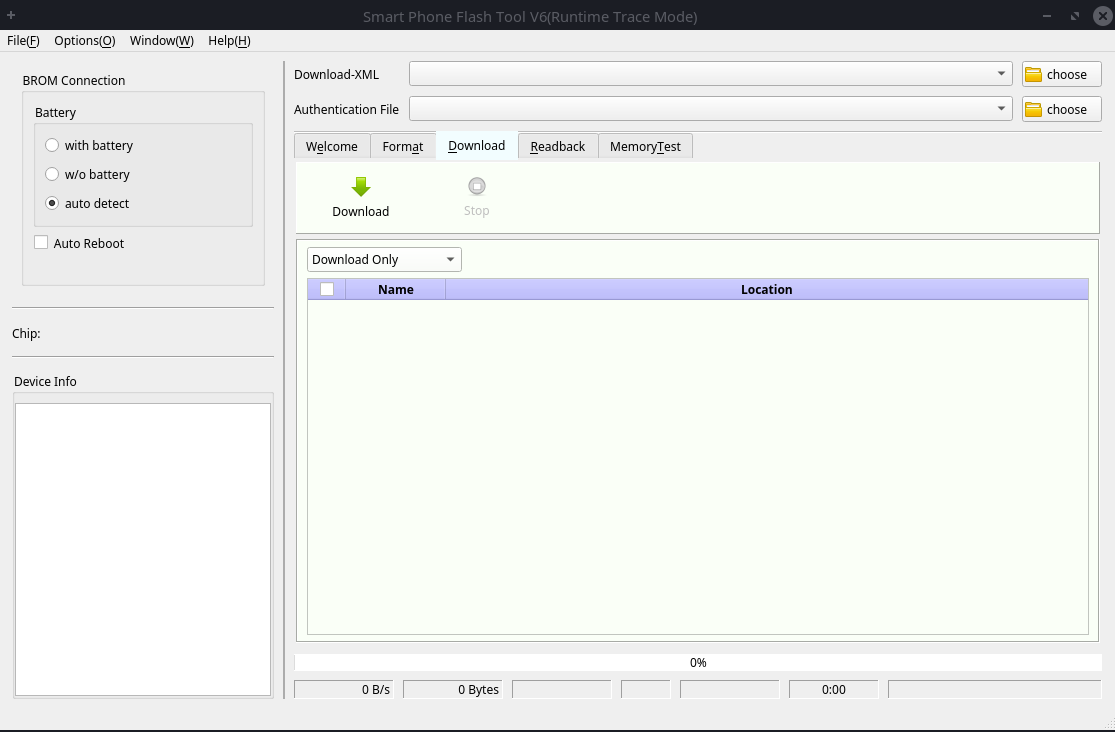
Open up the pull down for Download XML and choose the flash.xml file in the iodeoss7.7 package which is in the download_agent folder.
Pull down the download menu and change to Format All + Download. This is what it would look like before plugging in the phone:
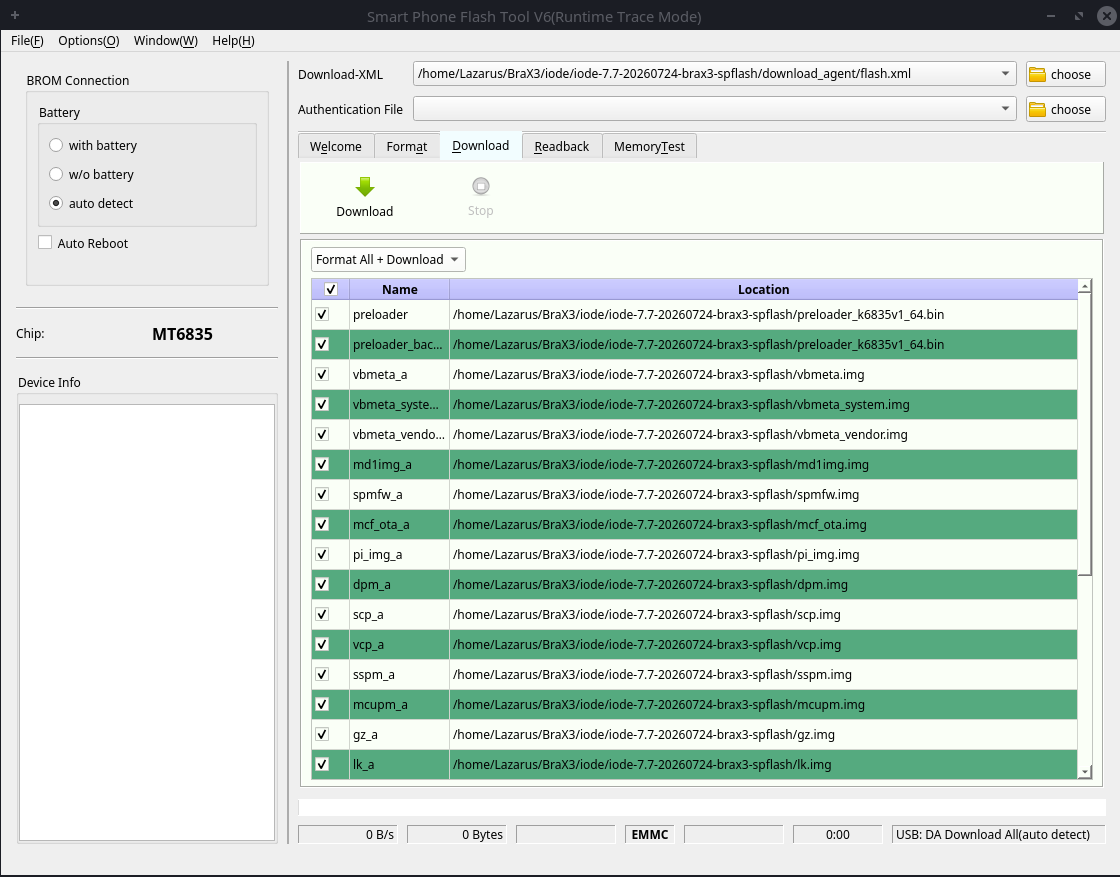
Click on Download.
Now plug your powered off phone in using a data USB-C cable. U should see a progress bar at the bottom of your screen. On my computer it took 1:50 minutes and ended with this:
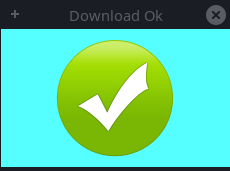
Now start your phone by holding the power button till u see the brax logo.
If u have a seedvault backup then u can restore that now. Going in phone settings>About will show that IMEI numbers are empty and that your serial number is no longer BraX3xxx but X41JFAxxx.
Now if u decide that u want the ability to make phone calls again, I posted some screenshots of doing that HERE:
I confirmed that phones with no IMEI cannot even make emergency phone calls!
You are now invisible to cell phone towers…hopefully government warning alerts cannot get to your phone doing this! I did also turn off emergency alerts.
Use Delta Chat or XMPP to message people!
Apparently people in the UK have also been upset at getting genuine (not test) alerts without warning. https://www.bbc.com/news/articles/cwyllkz80dlo The link at the bottom has some bland advice in govt speak “Your device may …” On the page about “Operator Tests” they give a number to enter a settings menu *#*#2627#*#* On my Brax3 this has no settings, but toggles between
Mobile broadcast testing mode is dis/en/abled
I’ve set mine to disabled, will I remember next time there’s a test …
That’s cool, thank you, apologizes for afk for so long, been somewhat distracted.
Thank you very much for this. Very helpful in clearing up much of the newbie uncertainty anxiety. Very grateful for your efforts.
Same here but it seems to only block our local amber alerts. There was a national test late last year that did get through when test alerts were disabled! I’m in USA. 
To put it in simple terms.
The Australian alert system uses the cell tower to broadcast, known as geotargeting, and bypasses the normal SMPP route between phones. All phones connected to that tower will receive the alert. The message originator doesn’t know who will receive the message alert. Aeroplane mode or turning off the phone apparently for 24 hours will stop you receiving the alert.
It’s a critical alert and there is no way to turn it off in settings of emergency alert notifications.
I turned my phone off at just before 2pm AEST and turned it back on about 15 mins later. I still received the alert.
I worked in the industry for 18 years and wrote software for SMS telecommunications.
This is a iode’ software problem overruling our privacy. In the early version right after I got my BraX3 phone, the operating system respected the settings on the phone and I did not get the alert that everyone else got.
Somewhere down the line iode’ changed their mind and added this psyop alert regardless of our settings. The phone is now compromized because if they can allow this to happen, they dont care about our privacy and more can be added forced from the authorities that we will not be informed about.
The only way these alerts gets shown and plays the sound is if iode’ has code that does it. If I create a phone OS from the bottom, I have to add code to the phone to actually receive and show the alert as that part is an hidden app in itself. No code, no alert. Plain and simple.
We have NOT asked for this, the alerts are turned off in the settings, we still receive it. iode’ MUST fix this to save their integrity and reputation. The BraX3 team must push for this if they still want to call this a Privacy phone.