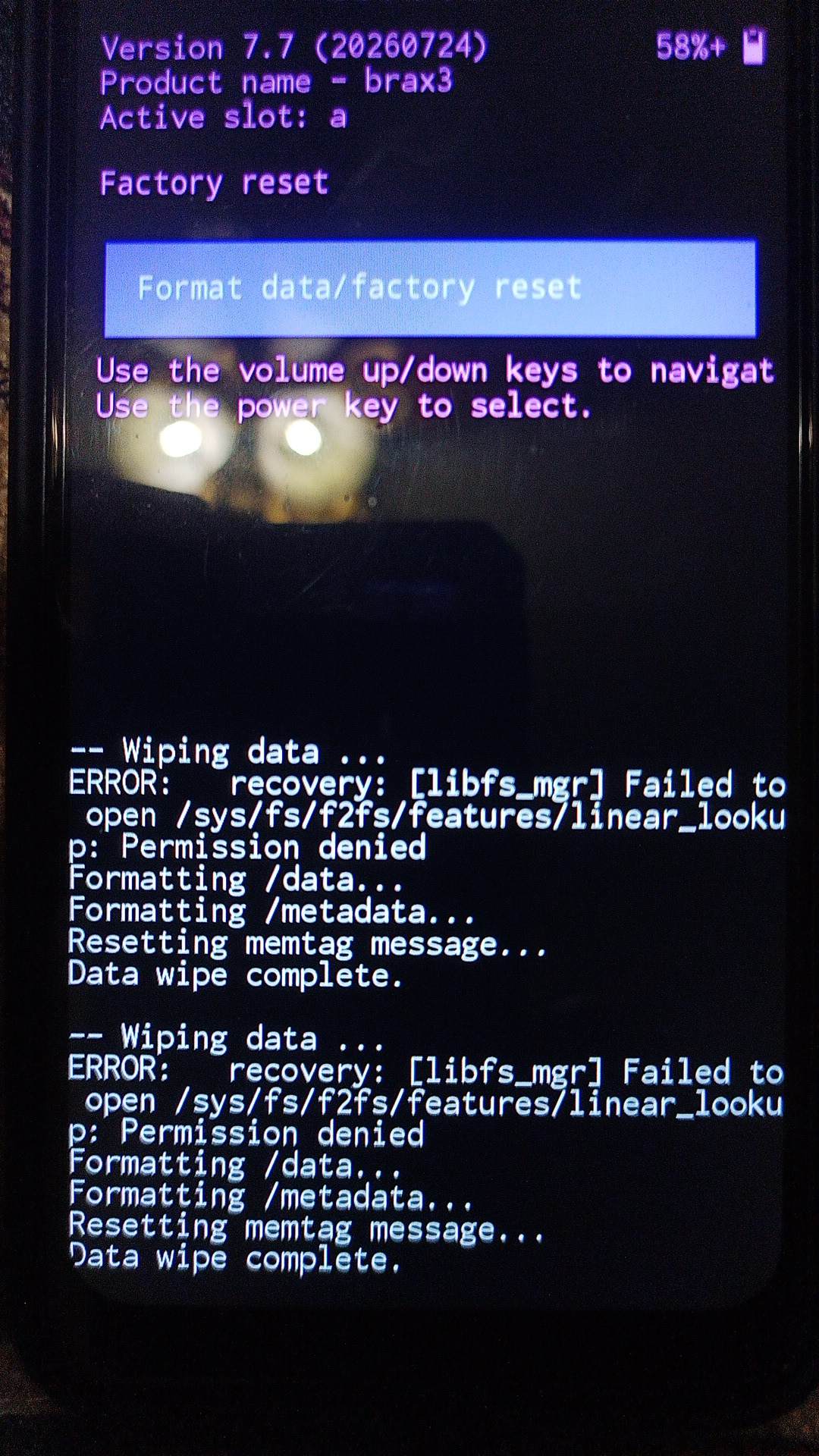
I have read some posts on proceeding on to attempting to do SP Flash or other, but these were older posts, and I wanted to make sure I was following the most recent processes for someone with a phone doing the things that mine is, with the above error. Thanks.
Did you try just holding down the power button a long time before doing anything else?
I saw in one YT video where it said to not worry if you get a black screen with small writing on it and to just press and hold the power button until it restarts.
Your past trying this though, once you tried to reformat and reset it.
Did not notice anything in particular, I hadn’t switched over/on the Brax3 phone to my mobile network yet (Still using my Brax2). Unless it was doing an automatic update of some sort I hadn’t been using it for anything except taking some pictures, and using the Flashlight option because the one on my Brax2 stopped working…. In fact the last thing I had used it for was to find something on the floor with the flashlight. I marveled at the battery life the Brax3 phone got as compared to my Brax2. Can you provide a link to the Procedure you would have me follow? Thanks
Add: Ok, I found opensource.braxtech.net which is the first time I have visited that location, and it appears there are various instructions for iode Reload….
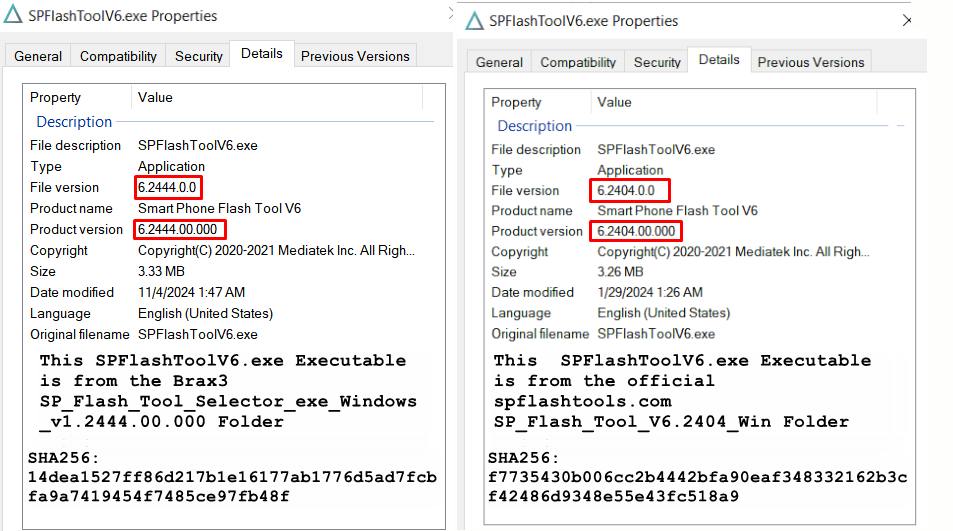
There is a difference in the Brax3 hosted SPFLash Executable as compared to the official SPFlashtools.com Hosted executable shown below. Should I be concerned?
Nothing to be concerned. These are different versions. We suggest that you use the one we’ve uploaded, since it’s the one we’ve been doing testing with.
Yes, I took a picture, when I originally got the phone, of the side of the box with the IMEI #'s and Serial Number. SN: BraX32025… I have emailed tech support because, although I am willing and able to try more things, I don’t want to accidentally brick the device.
I hadn’t yet activated a carrier (T-Mobile) on my Brax-3 as I was waiting for the bugs to get shaken out first… I am still using my Brax2 currently. So I could send the Brax3 in to have the professionals look at it as opposed to me doing something that could make things worse. I have all the original packaging and accessories (except for the SD card that never came, and 1 of the two screen shields that was broken on arrival that they never replaced).
U could try another download setting in SPFlash. SPFlash has never bricked my 2025 BraX3. I will get in front of a computer so I can see what else u could try.
OK, I looked at my past posts. U want to pick Firmware upgrade. This will wipe all your settings, though. It shouldn’t wipe your IMEI settings but I have had it do this. U can restore them using Windows and SN Writer. I did this many times and fixed it. Here’s a post I made with screenshots:
I have a feeling that my past actions, both in the Brax3’s Recovery screens and also my use of SPFlashToolV6 to Download Only (less User Data) i.e. Method-1, and then Method-2 Format All + Download , would have resulted in the wiping of my original IMEI’s and serial number.
I have not yet tried writing a different OS (Ubuntu Touch) and then trying to go back to iode, so I am not sure if your previous posts experience would be the same. I have not unlocked the bootloader on my Brax3 either.
My concern is that, if there is a hardware element of failure in the phone, that attempting to update the existing firmware could result in corrupting the firmware that appears to be allowing the phone to get as far as its getting while still allowing me to get back into boot recovery tasks in support of being able to power down the phone to charge it. I’m not sure if the “Firmware” would be the Phone’s ROM, and if the aforementioned functionalities are supported by either, but definitely would prefer not to loose my current boot recovery capabilities.
Maybe if Brax Support can chime in on the matter I would feel more comfortable with attempting it.
Your situation where you did the “Firmware Upgrade” was on a phone that had not been in an initial boot loop, where attempting the SPFlashToolV6 Method-1 and Method-2 had failed to recover it from that loop. You had a pretty good chance of knowing you didn’t have a possible hardware issue since you were just trying to go from Ubuntu back to iode, no boot loop present.
I’m not sure how to get tech-support user’s attention regarding my most recent results and your suggestion?
Did you ever look back to when this all first started and what caused it or what you might have done to cause it?
It’s very odd to just go into a endless boot loop you can’t even bypass for no reason at all. So do you remember what happened or maybe any new apps your installed right before this all started?
This is one of the biggest problems with these type of phones, people do all kinds of things then brick them and blame the phone not what they were trying to do. Not saying this is what you did, just very common for people to try things and brick phones then wonder what happened.
Short answer: I am not one of those people. I am (to an extreme) the opposite of those people.
Long Answer:
That’s just it, I hadn’t downloaded any apps. The only apps that were on the phone were the stock apps, and any additional apps the sequential updates all the way to 7.7 might have added.
Occasionally I would use the phone to take a picture of something I had on the desk that the phone has lived on since I got it. The only issues I had ever had was with the iode updater between 7.3 and 7.4 in March & April of 2026. In all my post inquires you can see that I am overly cautious of doing anything that could be non-official, as I have been mostly interested in determining the new Brax3 and iode version(s) were as stable as possible before switching over my carrier T-mobile from my (mostly) working Brax2 to the newer Brax3. The Brax3 was never even put in my back pocket! It has been pampered since I got it, no experiments, no unsanctioned manual updates. This is why I would prefer to wait until an official Brax Support person @tech-support can tell me what is best for me to do next. The most aggressive thing(s) I have ever done with the phone have been in trying to address this boot loop issue, the Boot Recovery factory reset, and SPFlash Method-1 and 2 process… and I took days reading & studying the instructions and analyzing the Official and Brax hosted versions of Mediatek USB Drivers and Executables before proceeding. I even ordered and waited to receive a brand new short 10Gbps USB C 3.2 Gen 2 cable to minimize any issues. When I joined the Brax community in March of 2022 with the purchase of the original Brax2 I was willing to roll with the punches of a new platform for the reward of better privacy, there have been hurdles along the way of which I was willing to jump through (Cloning IMEI’s to get past carrier roadblocks etc etc), and with the Brax3’s new iode OS I knew there was probably going to be some more, so I am hoping that a solution can be had even if I have to send the phone back to the professionals to insure I don’t do something that would prevent the phone from being recovered.
If you are still unable to get your device working, we can exchange it for a new one so you can start fresh. It’s possible that a low-level issue was introduced that you are not able to fix by reflashing the OS.
We will email you with next steps on how to get a replacement.
 Not saying this is what you did, just very common for people to try things and brick phones then wonder what happened.