How to Change the IMEI Number on Your BraX3

I would not attempt this. The Verizon 4G and 5G RF networks use millimeter wave and may not support other UHF frequencies such as the 600 MHz(band n71) and 700MHz (band 12). These bands are located in areas with thinner networks (rural and low population density areas). The 700 MHz band can penetrate obstacles more effectively. T Mobile ( Not including Ultra capacity 5G) 5G (Extended Range 5G)

Band n71 (600 MHz)

4G LTE

Band 5 (850 MHz)
Band 4 (1700/2100 MHz)
Band 66 (Extension of band 4 on 1700/2100 MHz).

Extended Range 4G LTE

Band 12 (700 MHz)
Band 71 (600 MHz)

2G

Band 2 (1900 MHz)

I’m regretting getting the BraX3. I wish I had just donated to the cause so that the BraX4 might be a product worth getting*

*If you have a dual sim and want to use BOTH of them, and if you’re super happy with the regular AT&T service with 6 months remaining in a yearly prepaid setup, and have tried t-mobile and found it doesn’t work, then the BraX3 will be a HUGE, a GD MAJOR time suck. Don’t get the BraX3 if you want something that works out of the box, and if 40+ hours of setup is not up your alley…

I was one of the most patient backers, even chastising folks for being upset with the delay’s. I said stuff like ā€œdont spend the money if you can’t imagine them not following throughā€ and ā€œhave patience, it’s coming, it’s a lot of workā€, but now that I have it, or should I say have HAD it in had for months now, it STILL is a paper weight and not functioning. I’m so disappointed. Brax man said ā€œThis will work on AT&T. It might need a small thing here or there to make it work, but it will work.ā€ I’d have to say, PHOOY. it works if you have another phone to rob IMEI numbers from, so why bother getting a second phone???

Ok, so I got to this thread: How to manually install or update your OS on your BraX3
Great, I learned how to put IodeOS on a phone with IodeOS already. But that’s a good lesson on flashing the phone. So I took those steps and applied it to the above linked LunarOS. This also worked well. From LunarOS, I was then able to change the IMEI numbers with the SN Writer Tool. This worked fine. I then went back an reflashed IodeOS. And I infact have different IMEI numbers then what I started with. This is seemingly great, and the desired result. Just be sure to only select ā€œDownloadā€ within SP Flash Tool when reflashing IodeOS from LunarOS or else it will wipe the IMEI numbers and you’ll have to redo the above steps (NOT ā€˜Download & Format’).

Ok, so it seems like I’ve got what I want. But the IMEI numbers I used from 2 of my old ATT phones will only work for physical SIMS, not the eSim. Somehwere on AT&T’s end, when I called to switch the esim from my current phone to the brax3, they said it wasn’t possible, and that IMEI number will only go onto a physical sim, not an eSim. Seems like the IMEI is identifying the phone and other info that AT&T sees as ā€˜not compatible’ as an esim. Maybe someone else can shed light. But at the moment, they can not switch my esim. And this is my last hurdle after months of learning de-googled processes… to even see if it’s working and what i want. WHAT A HEADACHE!!! I only have so much skill in this department. Should I just go back to the stock IMEI and see if AT&T will switch the esim to that, even though it’s not ā€œan approved deviceā€? I originally threw my physical sim and it worked, but I got messages from ATT that said otherwise and to call tech support. Which I didn’t do because I’m under the impression they won’t help…

Is there no way to just generate a IMEI number that will work, or should I go hawking ebay listings and steal some IMEI numbers there and screw over the future purchasers?

3 Likes

You don’t need another phone to grab an IMEI number. You can just find one on the internet somewhere, change the device number from [6:1] (or just change the second to last number), then use an online IMEI calculator to generate the last checksum number. The last digit of the IMEI is a kind of checksum the the numbers before that are. I would just find an IMEI of a phone with a physical and esim online somewhere and modify the serial digits and check digit and use that. Also just use Lunar OS. If you need another IMEI change in the future it’s easier and I’ve been using it daily - no issues.

1 Like

TY
ok, so if I goto https://www.imei.info/ they seem to offer quite a bit. I found they have a IMEI random generator, for various phone brands and models. I’m just using the Samsung since I know they are a common AT&T phone, from experience Samsung IMEI Generator - IMEI.info
It spits out 10 random IMEI’s at a time, all of which pass the precursory IMEI check. However, when you use one of the random numbers and do an ā€œIn-depth warranty & carrierā€ check, it doesn’t retrieve specific details like my legit IMEI does. (IMEI.info refunded me for the IMEI numbers that didn’t produce valid reports. The ones that went through cost $4 each to check…)

Anyway, after diving in that site, I’m able to iron out which phones do and don’t offer esim support, so that is helpful, understand the 1st 8 digits of the IMEI identify the device info, the next 6 numbers ID the serial number of the phone, and the last digit (as you mentioned) identifies the check digit. Regardless, I’ll be trying one of the random generated numbers tomorrow and see if it by chance will pass AT&T muster. Good advice, I’ll also just leave lunarOS and not reflash IodeOS [until I completely finish the IMEI hurdles maybe]. I’ll also have to look back in this thread for the better version that doens’t have the red ā€œDebugā€ letters in the corner. Just an honest opinion, when exploring the version I’ve flashed, I wasn’t impressed. I’m old school, but I guess I’m not as old school as I thought: it’s like a UI from >10-15 years ago, but we’ll see.

I’m not sure if anyone has the spectrum mapped out, but on one end we have privacy-gestapo (10) and on the other we have the highschooler who has no concerns about privacy just get me on tiktok (1). I was[am] a 10 at heart, but never was able to get above a 5 or so. (5 is someone who is aware, and practices semi-strict principles with a standard ā€˜googled’ phone. Uninstalling as many apps as possible, disabling all bloat ware possible, restricting permissions as much as possible, etc.) My current situation requires some apps, features, and services that I have to utilize. So far I’ve been able to get myself up to a theoretical 10 (i’ve installed and tested all the apps I require, and with IodeOS I was able to restrict and allow exactly what I need). If I get this IMEI thing figured out, and get to use the phone, I hope to be at a 9 or 10.

Thanks again for the input, your time is valuable to me, ty!!

1 Like

@jamieSG69

There are instructions to remove the red debug letters in the corner of LunarOS - scroll up. UI feels ok to me after I change to gesture controls in the settings (I’m coming from an iphone 13). You should be able to get AT&T working, it may take a few tries with getting the right IMEI. I did get AT&T working on the BraX2 with some pixel IMEIs (with modified serial and check number)

2 Likes

Yes, I see the instructions above, TY! TBH, i dont think i’m going to spend time on that. what a bunch of steps to just get rid of those letters… smh
BUT, I don’t think it matters: can anyone verify that LunarOS will work with dual sim/eSim? I tried switching over to the generated IMEI today, but when i needed to provide the device’s EID, there’s none to be found. I can go to settings to search ā€œEIDā€ and see a result for ā€œEIDā€ but clicking on it just takes me to ā€œAbout phoneā€ where no EID is present. So I could not switch my eSim over today. I will have to re-flash IodeOS so that I can use the BraX3 EID and try again tomorrow.

Am I an oddity, does no one else rock 2 numbers and need 2 sims?

Thanks again for your input!! I’ll keep at it and let you know how this works next try…

1 Like

Alas, after several hours today, on the phone and chat with tech support, followed by an in store visit, it seems I’ve reached the end of my rope.

I will be listing both BraX3 phones I have on ebay shortly;
1 i’ve been trying to make work,
the other is still in the packaging and I had bought it as a backup since it’s obscure phone.

I appreciate everyone’s help, the BraX3, as much as I really wanted it to be, is not for me. I’m very happy with my current AT&T plan, not to mentioned I’d lose $300 worth of remaining prepaid contract, and it seems the BraX3 is not e-Sim compatible with AT&T at all. So unfortunately, my loss is someone else’s gain.

The phone I’ve been testing with, I’m letting go for $100+/-, and comes with privacy screen installed in the rugged case.
The second phone is still sealed in the package and should contain another privacy screen and rugged case, this one I’m hoping to recoup most of it for about $300.
The link will be edited back into this reply HERE.

Please, as much as I might appreciate a good idea and one last try, I AM NOT CONTINUING WITH THIS. It may be I’m just a breath away from getting what I’m looking for here, but I’ve just got to stop wasting time on this at this point. Too much in and nothing out, it’s good time wasted after bad, plus money.
THANK YOU THANK YOU THANK YOU!

2 Likes

I might buy it once the listing is up.

2 Likes

Actually, it’s best if you select Firmware Upgrade when you switch to a new OS. Download only works well if you’re upgrading a new version on the same OS.

2 Likes

SO matter what cable i user i still get this in the log

SmartPhoneSN::SP_Preloader_BootMode(): Preloader boot meta mode success!! (SPexc.cpp:1278)
10/28/25 15:15:17.158 SNWriter[8636][1492]: SP_BROM::SP_GetUSBCOMPortWithFilter(): enum kernel comport… (SPexc.cpp:1056)
10/28/25 15:17:17.266 SNWriter[8636][1492]: ERROR: SP_BROM::SP_GetUSBCOMPortWithFilter(): enum kernel comport fail(1042). (SPexc.cpp:1060)

ANy thoughts?

1 Like

What OS is your BraX3 on?

1 Like

It has IODE on it. Every time i try change IMEI on it it just fails with that error above. Someone (rik?) earlier in thread had same issue.

1 Like

The SN Writer tool doesn’t currently work with iodeOS. You will need to switch to Lunar OS via spflash tool, change IMEI via SN writer (following these instructions), then switch back to iodeOS with spflash tool using firmware upgrade option.

2 Likes

Is there a link to IODE os for the writer tool? I was able to flash to Lunar and change the IMEI. Would like to go back to IODE but the installer on the site doesnt work as says my phone not compatible. Cant find the download like i did for lunar. thanks

1 Like

Can someone report what version of SN Writer - and the mediatek driver - have given them success? I installed MediaTek-SP-Driver-v5.2307. Plamen’s link to SN Writer doesn’t work for me, so I went searching. At snwritetool.com the most recent one I could get to download is v1.1916.0.0 (others just hung), while at hovatek.com I found v2.1504.0.0. Neither has worked for me.

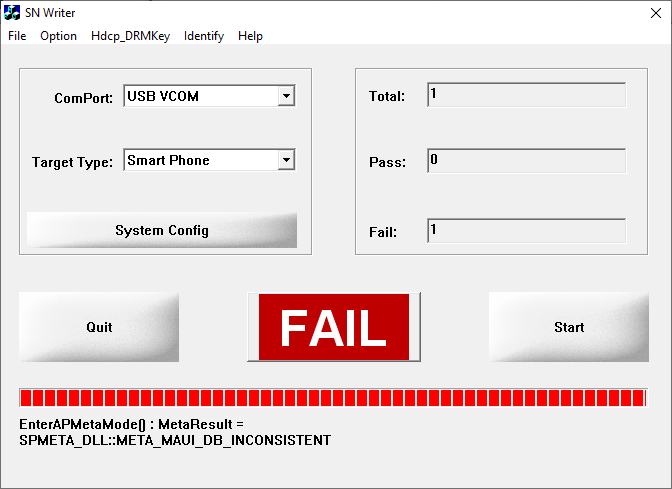
  • With v2.1504.0.0 , I get ā€œEnterAPMetaMode() : MetaResult = SPMETA_DLL::META_MAUI_DB_INCONSISTENTā€ on the screen but ā€œERROR: SmartPhoneSN::META_NVRAM_Init_Ex_Mdtype_r(): Init MD[0] database Fail, MetaResult = General error (SPexc.cpp:3269)ā€ in the log - that’s the same as below. Puzzlingly, the log for v2.1504.0.0 reports it is v1.1916.0.0, so maybe part of the old one is getting invoked by the new one. Yes, I definitely shut down the running version of 1.1916.0.0 before attempting 2.1504.0.0.

  • With v1.1916.0.0 , if I check ā€œLoad AP DB from DUTā€, I get in the log & on the screen "

ERROR: SmartPhoneSN::META_NVRAM_Init_Ex_Mdtype_r(): Init MD[0] database Fail, MetaResult = General error (SPexc.cpp:3269)
ERROR: SmartPhoneSN::LoadModemDatabase() : MetaResult = General error (SPexc.cpp:3857)

"

  • with 1.1916.0.0 , if i do not check ā€œLoad AP DB from DUTā€, I get in the log & on the screen "ERROR: SmartPhoneSN::LoadAPDatabase(): fail, [NVRAM] MAUI and DB is INCONSISTENT (SPexc.cpp:3171) "

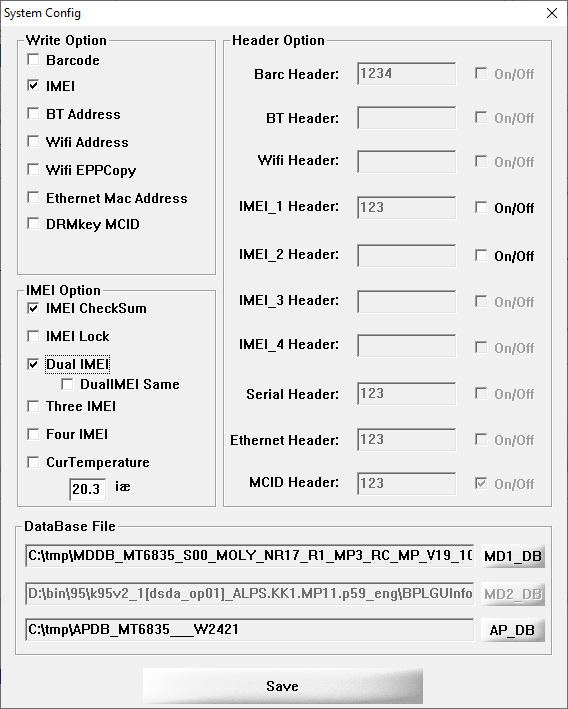
I don’t know how to check the sha256sum for the AP-DB files, but I downloaded the rar a 2nd time just to be safe. I’ve tried manually removing the suffix on the MD1-DB file to match what Plamen wrote. I’ve tried with & without ā€œDual IMEIā€ checked, and using the IMEI value I had recorded before it was clobbered, as well as one from a samsung phone. Yes, I believe the driver is installed correctly, because when I plug in my device when the phone is on, windoze tells me ā€œYour device is set up & ready to go.ā€ (I don’t know what ā€œMeta Modeā€ means, but yes, it flashes on my phone’s screen after being plugged in.) I’ve tried running SNWriter as myself & as administrator. I’m (lamentably) trying all this on windoze10 - would much rather be using linux.

One last question: I recorded the IMEI value for sim slot 1 before it was clobbered, but I didn’t record any for sim slot 2. The most likely reason I didn’t record that was that it was set to ā€œUnknownā€, but now I’m having doubts. Would support have my sim slot 2 IMEI on record? Or is it the case all BraX3 phones had Unknown for slot 2?

Are you on LunarOS as plamen says?

The checksum is the command sha256sum file on Linux and you can find some similar tool on Windows.

My slot 2 IMEI is 8 units larger than the slot 1 one, you probably deleted it during the process.

Try some other cable in case this is the problem.

Thanks for the response, George. :slight_smile:

Per the last item in this post, I’d love to hear version numbers for executables & drivers - plus sha256sums for DB files - that are known to work.

(BTW, I was wrong about the log reporting a different version than the software I was running: I was looking at the wrong log because SN Write 2.1504 writes its log to ā€œC:\SN Writer.txtā€ instead of ā€œC:\SNWriter_LOG\ā€.)

I presently have LunarOS v6.0.0-20251001-X3 on my phone, and Windows Pro 10.0.19045 on the laptop I pulled from my closet & dusted off for this endeavor.

I’ve tried 3 different cables: an old one resulted in ā€œdevice not recognizedā€, but the other 2 proceeded & pulled the META_MAUI_DB_INCONSISTENT error. I’ve tried various USB-A ports on the laptop. (There are no USB-C ports.)

When I try to download tho SN Writer link posted by Plamen, I get ā€œWorkingā€ statuses from my browser & the Denver Cloudfare, but a ā€œbad gatewayā€ error from file-share.space. The filename in the link contains no version identifier, so I’m not sure which version to track down elsewhere. I’m opting for the latest of v2.1504.0 but have also tried v1.1916.0.

Because I didn’t record the IMEI for slot 2, I’m using the unaltered IMEI from a Samsung phone for the 2nd IMEI. But I’ve also tried not checking ā€œDual IMEIā€, and then specifying only the one for my BraX3 slot1.

The sha256sums I’m using, as reported by Get-FileHash:

Algorithm       Hash                                                                   Path
---------       ----                                                                   ----
SHA256          007A60275230357EB5FE339A13D9CFF14ABFDB0AF7D878C85830D7347F79BE54       C:\tmp\MDDB_MT6835_S00_MOLY_NR17_R1_MP3_RC_MP_V19_10_P3
SHA256          2181B7F61EDDF6E12BB7F7C833294A455A36212CEA638E1CAE32CEB8D41FF925       C:\tmp\APDB_MT6835___W2421
SHA256          97D38F7079A01D030EE0EFCF352723A320297ADC93EC58789EF7863121535FC7       C:\tmp\BraX3 AP-DB.rar
SHA256          0E7FE6124ABEEDA11F0F68FD75C41A22D6D0A4B5EA61E75B5D8A79F6065855FD       C:\tmp\SN_Write_Tool_v2.1504.00.zip
SHA256          6C8C9C07DEE3FD76EC22B26BE924DE47E2ECEB4729D82D98CE5E50C13F7BF0BE       C:\tmp\MediaTek-SP-Driver-v5.2307.zip

In the screenshot, know that I didn’t specify a value in the greyed out MD2_DB field - the value shown was pre-populated.

The error I’m getting from SN Write is documented at hovatek.com with the following:
META_MAUI_DB_INCONSISTENT
Message: EnterAPMetaMode() : MetaResult = SPMETA_DLL::META_MAUI_DB_INCONSISTENT
Meaning:The DB file(s) being used aren’t compatible with SN Writer
Solution:


SUCCESS

  • If you neglected to note both IMEI values before clobbering them with a ā€œFormat All + Downloadā€ flash, know that those values - along with your Serial number, which probably got clobbered too - can be retrieved from the external label on the box your phone came in.
  • I tried many versions of SN Writer Tool, but only one gave me success: v1.2436.00. It’s available at snwritetool.com.
2 Likes

fastboot flash init_boot_b init_boot_patched.img
Warning: skip copying init_boot_b image avb footer (init_boot_b partition size: 0, init_boot_b image size: 8388608).
Sending ā€˜init_boot_b’ (8192 KB) OKAY [ 0.188s]
Writing ā€˜init_boot_b’ FAILED (remote: ā€˜No support by lock control’)
fastboot: error: Command failed

Been reading some of jamieSG69 posts and oh man it looks like theres more than meets the eye than the basic instructions for changing IMEI. Have these additional technicalities been updated since then in the instructions? Hoping a more streamlined approach has been standardized, as I do not want to end up with a major headache like he did, my heart goes out to him. My regards to the folks here pushing against the Device ID tyranny.